Skip to content
Contact Us

Back to Case Studies

How RevPartners Helped Company W Centralize Customer Success in HubSpot

No stats detected. Module will be hidden.

Customer Info

Company W provides software that helps organizations manage complex services, compliance requirements, and operational workflows for their clients. Their platform is used by teams that need accurate records, strong operational visibility, and reliable systems to manage long-term customer relationships.

As the company grew, their internal teams relied on several tools to manage customer data, support activity, and account history. With more customers and more moving pieces, it became more important to have a clear view of the full customer lifecycle without adding extra work for the team.

Overview

Before working with RevPartners, Company W was managing Customer Success in Totango, support activity in Zoho, and customer data in HubSpot. Each system worked, but they didn’t work together. Because of that, the team often had to update the same information in multiple places just to keep records accurate.

Company W already had HubSpot Service Hub Enterprise, but it wasn’t being used as the main system for Customer Success. Instead, the team was maintaining multiple platforms while still relying on manual updates to keep everything aligned.

The goal of the engagement wasn’t just to migrate tools. It was to simplify the system, reduce technical debt, and bring Customer Success into the same connected platform as Sales and Marketing.

RevPartners led the migration from Totango to HubSpot, implemented the Customer Success Workspace, and rebuilt the data model so Company W could manage Customer Success, renewals, support activity, and account health inside one system.

The Challenges

1. Customer Success lived across multiple systems 

Company W had solid Customer Success processes in place, but those processes were spread across different platforms.

Customer Success activity was managed in Totango, ticketing and support lived in Zoho, and HubSpot was used mainly as a CRM. Because the systems weren’t fully connected, the team often had to update the same information in more than one place.

Customer Success data didn’t automatically sync with Sales or Marketing, which meant important updates had to be entered manually across systems. As the company grew, this created friction in day-to-day work and made it harder to keep everything consistent.

2. Manual touchpoints and limited integrations slowed things down 

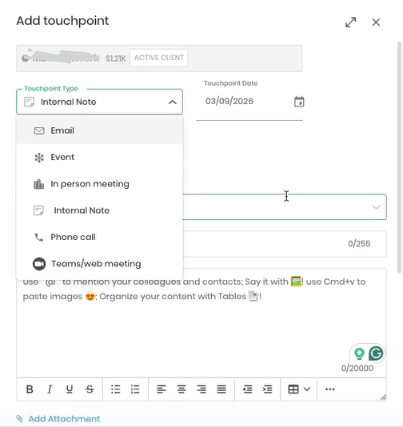
Customer Success Managers were logging meetings, emails, and notes manually inside the Customer Success platform. When deals closed in HubSpot or account details changed, those updates didn’t fully carry over.

The existing integration handled only basic updates, so the team still had to check records and make changes by hand. Over time, this added extra work and made it harder to trust that the data was always up to date.


add touchpoint


3. The integrations were difficult to maintain 

With three separate platforms in play, keeping the integrations between Totango, Zoho, and HubSpot running smoothly required ongoing technical attention. These kinds of integrations are inherently complex, and maintaining them is a real cost whether it shows up as headcount, outside help, or just time spent troubleshooting.

Without a dedicated resource managing those connections, data would occasionally fall out of sync, and the team would have to manually reconcile the gaps. The same applied to Zoho as keeping that integration healthy required the same kind of ongoing attention.

4. Technical debt continued to build 

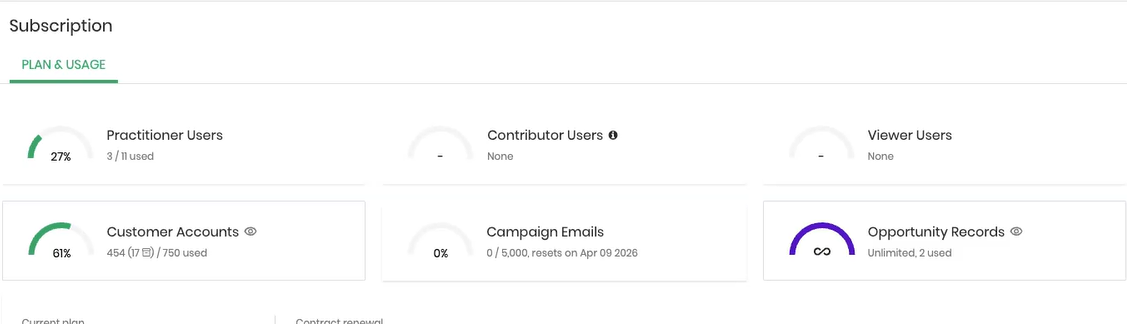
Maintaining three separate platforms meant Company W was paying for capabilities they largely already owned in HubSpot. The Totango subscription ran $15,000 annually, but the licensing structure only covered the core Customer Success team, and not everyone who interacted with clients had their own seat.

Without full access across the team, logging touchpoints consistently was nearly impossible. Activities would go unrecorded, data would be incomplete, and getting a true 360 view of any customer became unreliable. The people who needed visibility into client activity didn't always have it, and the people who had access weren't always the ones doing the work.


subscription plan and usage


5. Lack of connected data limited visibility 

Because Customer Success, Sales, and Support data lived in different platforms, it was difficult to see the full picture of an account.

Renewals, support history, activity, and lifecycle status were all tracked, but not always in the same place. Reporting took extra effort, and it was harder to use Customer Success data to inform revenue or operational decisions.

Company W wanted a simpler system where the entire customer journey could be managed in one connected workspace.

The Solutions

1. A structured migration, not just a tool switch 

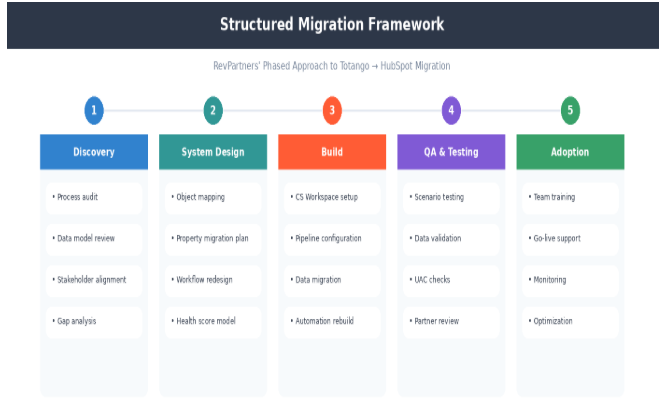
RevPartners approached the project using a structured migration framework instead of simply moving data from one system to another.

The engagement included discovery, system design, build, and adoption phases to make sure the new setup matched how the Company W team already worked. This allowed the migration to reduce complexity without forcing the team to change their process.


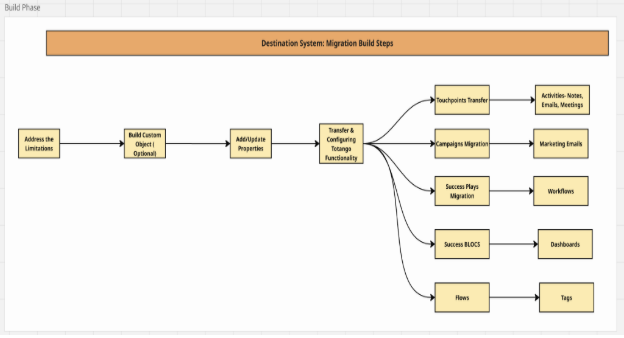
destination


Objects, properties, workflows, and associations were rebuilt inside HubSpot so Customer Success could live in the same system as the rest of the customer lifecycle. 


structured


2. Replacing Totango with the HubSpot Customer Success Workspace 

RevPartners implemented the HubSpot Customer Success Workspace as the centralized replacement for Totango, moving Company W from a siloed, standalone platform into a unified environment where Customer Success, Sales, and Support share a single source of truth.

The transition focused on bringing the entire customer lifecycle, from post-sale onboarding through renewals, into a single workspace by optimizing how the team interacts with records and associations.

Specifically, the workspace was configured to anchor all data to either the standard Company object or a specialized Custom Object. This structure allows the Customer Success team to maintain clean account records that remain separate from Sales-specific information while staying within the same CRM.

RevPartners also built automated associations between these primary account records and related Deals for renewal tracking and Tickets for support escalations. This enables Customer Success Managers to monitor account health, support history, and contract status in one side-by-side view without navigating between different tools.

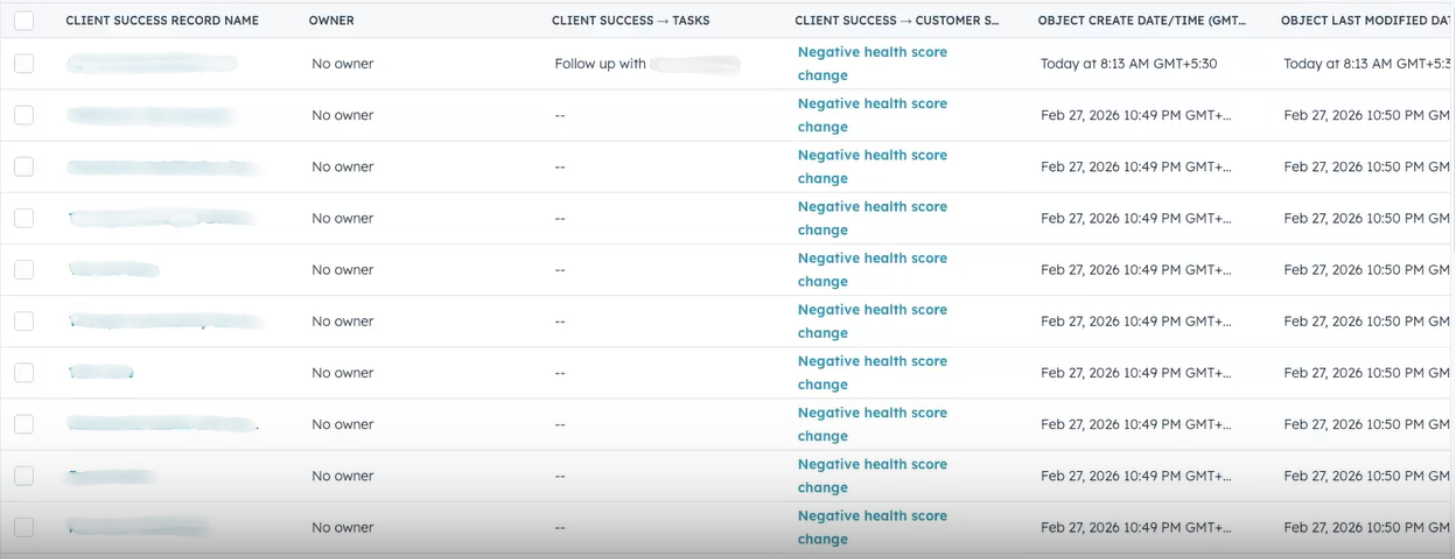
client success 1


Within the Portfolio tab, the team now utilizes custom views to organize and prioritize accounts by renewal date or health status, categorized as Healthy, Neutral, or At-Risk. Because all communications and meetings are natively logged in HubSpot, they are now automatically surfaced in the workspace timeline. This ensures that every customer touchpoint is accurately recorded and immediately visible to the entire team. 


3. Building a connected data model inside HubSpot 

RevPartners redesigned the Company W data structure to unify customer success, sales, and support data within a single platform. This replaced the previous fragmented model, where data was spread across Totango and Zoho, and established HubSpot as the single source of truth for the entire customer journey.

The foundation of this new model is a custom object used to represent customer accounts. By using a custom object rather than a standard company record, the system creates a clear boundary between active customer management and high-volume sales prospecting. This ensures the customer success team has a dedicated space to track long-term relationships without being buried in sales data.

To provide a complete view of each account, RevPartners built automated associations between this custom object and other critical HubSpot records. Every customer account is now digitally linked to its corresponding renewal deals, support tickets, and contact records.

This interconnected structure functions as a live entity relationship diagram, allowing the team to see how different activities impact one another. For example, a support ticket created in the Service Hub is automatically linked to the partner record and its upcoming renewal deal, showing exactly how technical issues might affect a contract renewal.

With this connected data model, reporting is now automated and more accurate. The team no longer needs to manually pull data from multiple subscriptions to understand account performance. Instead, they can run unified reports that show the direct relationship between support volume, account activity, and revenue retention. This transparency has simplified daily administration and eliminated the technical debt and costs associated with maintaining disconnected systems,


4. Building a numerical health scoring model in HubSpot

Rather than tracking a static account status, RevPartners built a numerical health scoring model inside HubSpot that assigns a specific value to each account based on their engagement with the platform and the team.

The scoring logic is organized into four categories: usage and engagement, sentiment and financials, support escalations, and customer advocacy. This allows the system to measure a range of signals like how often a customer uses the software, their NPS survey feedback, the number of support tickets they submit, and their willingness to act as a reference.

To keep the scores accurate, RevPartners applied group limits to the scoring logic. This prevents any single category, like a temporary spike in support tickets, from unfairly dragging down the overall score.

The model also includes a 44-day grace period to account for the learning curve of a new system. Scoring only begins once the initial onboarding phase is complete, so the data reflects long-term engagement rather than early implementation activity.

With this model in place, Company W now has the infrastructure to monitor account health over time as adoption grows.


5. Building a numerical health scoring model in HubSpot

By moving customer success into HubSpot, Company W eliminated the need for expensive, separate tools like Totango and Zoho. This consolidation significantly reduced technical debt by removing a specialized Totango subscription, at $15,000 annually, along with the overhead of managing disconnected databases.

Instead of needing a dedicated power admin to handle complex system changes, the team can now manage the entire customer lifecycle using the HubSpot tools they already owned.

To keep the new system low-maintenance, RevPartners implemented automation to handle data records. Previously, team members had to manually log touchpoints and copy-paste email data between different platforms.

Now, automated workflows handle record creation and association logic automatically. For example, when a deal closes or a support ticket is created, the information flows to the correct customer account without any manual work, keeping records accurate and up to date.

RevPartners also customized the HubSpot record sidebars to make the team more efficient. By overhauling the interface to surface only the most relevant data, such as real-time health scores and upcoming renewal dates, Customer Success Managers can now assess an account at a glance. This streamlined design reduces the time spent clicking through tabs and ensures the team can focus on managing relationships rather than administrative upkeep.
The Impacts

1. One connected system instead of multiple tools 

After the migration, Customer Success, Sales, and Support all operate inside HubSpot instead of being split across Totango, Zoho, and the CRM.

This means the team can see the full history of an account in one place without switching between systems, which makes day-to-day work faster and reduces the risk of data getting out of sync.

2. Less manual work and fewer data updates 

Because customer records, renewals, tickets, and activity are now connected inside HubSpot, the team no longer needs to update the same information in multiple platforms.

Touchpoints, deal updates, and account changes now flow through the system automatically, which makes reporting more reliable and reduces the amount of manual effort required to maintain records.

3. Reduced technical debt and lower operational overhead 

By consolidating into a single platform, Company W effectively eliminated $80,000 in annual technical debt and shifted to a Single Admin model. This change improved System Availability by removing the sync errors that previously plagued their multi-tool setup.

The system is now significantly easier to manage, allowing the team to focus on customer outcomes rather than fixing broken integrations or managing redundant software licenses.

4. A system that's easier to scale as the company grows 

The new setup gives Company W a cleaner, more connected foundation for Customer Success.

Because the data model, workspace, and pipelines now live inside HubSpot, the system is easier to maintain, easier to report on, and easier to expand without needing complex integrations or a dedicated power admin.

Instead of working around disconnected tools, the team now has a single workspace that supports the entire customer lifecycle and makes it easier to manage Customer Success as the business continues to grow.

Schematic - Switch Box

RevPartners is at Your Service

Does your revenue engine need built, fine-tuned, or supercharged?

To learn more about how to continuously improve operational efficiency and identify the gaps in your customer experiences, see what RevPartners can do for you, especially if you’re already using HubSpot or thinking about adopting it.

Heads up: this is an affiliate link. We may receive a commission if you use it to get started.