-1.png)
CRM best practices help you get things under control by auditing existing assets, setting consistent naming and organization standards, improving workflows, checking data quality, and keeping your team on the same page. The result is a CRM that's easier to manage and maintain as your business grows.

Bad news: Your CRM is messier than it needs to be.
Good news: You don’t have to rebuild from scratch.
These five CRM best practices will get things back in order and keep them there, so you’re not staring at the same mess six months from now.
Key Takeaways
- Audit your CRM: Identify outdated assets and determine what needs updating or removing.
- Standardize organization: Use consistent naming conventions and folder structures.
- Optimize workflows: Automate record creation with accurate names and key properties.
- Validate changes: Test workflows and monitor data quality.
- Maintain standards: Train your team and schedule regular CRM reviews.
5 CRM Best Practices to Follow

1. Audit and Clean Up Your CRM
Before you start cleaning up your CRM, you need to know what's in it. That means reviewing your existing assets to understand what they do, whether they're still needed, and what can be improved.
74% of sales professionals say they focus on data cleansing, from removing duplicates and correcting errors to standardizing data across systems. But getting your CRM in order goes beyond cleaning up the data. The workflows and other assets behind it need attention, too.
Start by creating a CRM asset inventory. Use a spreadsheet to document each asset's purpose, business impact, and recommended next step.
Focus on these five CRM asset types first:
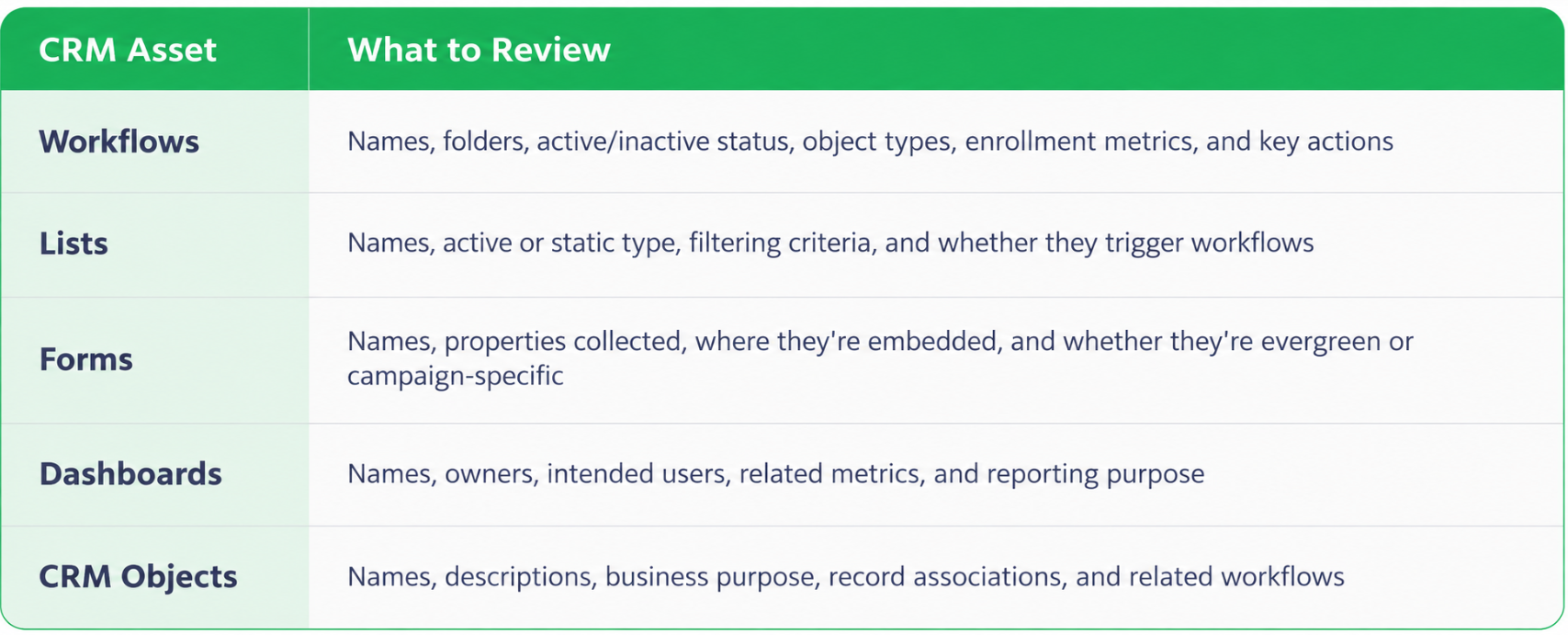
Depending on your CRM setup, you can expand your audit to include sequences, email templates, campaigns, and other assets. Start with the core categories rather than trying to review everything at once.
Understand What Each CRM Asset Does
Once you've created your inventory, review how each asset is being used and whether other processes depend on it.
For workflows, focus on the key actions, such as creating records or updating properties. For lists, check whether they're connected to active workflows. Dashboards should have a clear purpose and an identifiable audience.
Pay close attention to dependencies. A list that appears unnecessary might still trigger an important workflow. Removing it without understanding that connection could disrupt a process your team relies on.
You can gather much of this information directly from your CRM, but determining an asset's business importance may require input from the people who use it.
Decide What to Keep, Update, or Remove
Once you understand what each asset does, you can start making cleanup decisions.
Ask these questions:
- Does it still serve a business purpose? Determine whether the asset supports a process your team still uses.
- Is another asset doing the same job? Look for duplicate or redundant workflows and other assets.
- Does anything depend on it? Check for connections to other workflows or business processes.
- What happens if it's changed or removed? Consider the potential impact before making a decision.
Then assign each asset one of three next steps:
- Keep: It's still needed and functioning as intended.
- Update: It serves a purpose but needs changes.
- Remove: It's outdated, redundant, or no longer required, once dependencies have been reviewed.
Prioritize Your CRM Cleanup
Not everything needs to be fixed immediately. Prioritize assets based on business impact and urgency, then agree on the next steps with your team.
For larger CRMs, focus on one asset category at a time. You can spread the work across multiple phases rather than trying to clean up hundreds of assets at once.
By the end of your CRM audit, you should have a documented inventory and a prioritized cleanup plan that shows what needs attention and why. That gives you a clear starting point for making improvements without disrupting important business processes.
Planning a CRM Migration? Moving from Salesforce to HubSpot? Our 5-part series covers the data, integrations, and processes you need to get right 👇

2. Standardize CRM Naming Conventions and Organization
According to Validity's State of CRM Data Management report, workers spent an average of 13 hours per week searching for basic information in their CRM.
Consistent naming conventions and organized folders can help cut down on that frustration by making CRM assets easier to find and manage. Clear names also help your team understand what an asset does without having to open it.
The key is establishing standards that everyone can follow, rather than leaving each person to decide how to name and organize things.
How to Create CRM Naming Conventions
Start by reviewing your existing naming conventions. If a format already works well, you can keep it. Otherwise, establish a naming structure for each asset type and agree on it with the teams responsible for those processes.
For each convention, document the naming syntax (the format to follow) and a naming example (what it looks like in practice).
For workflows, we recommend naming them based on what they're for, what triggers them, and what they do.
For example: Lead Nurturing → Form Submission → Create Lead
This tells you the workflow's purpose (lead nurturing), what starts it (a form submission), and what happens next (a lead is created).
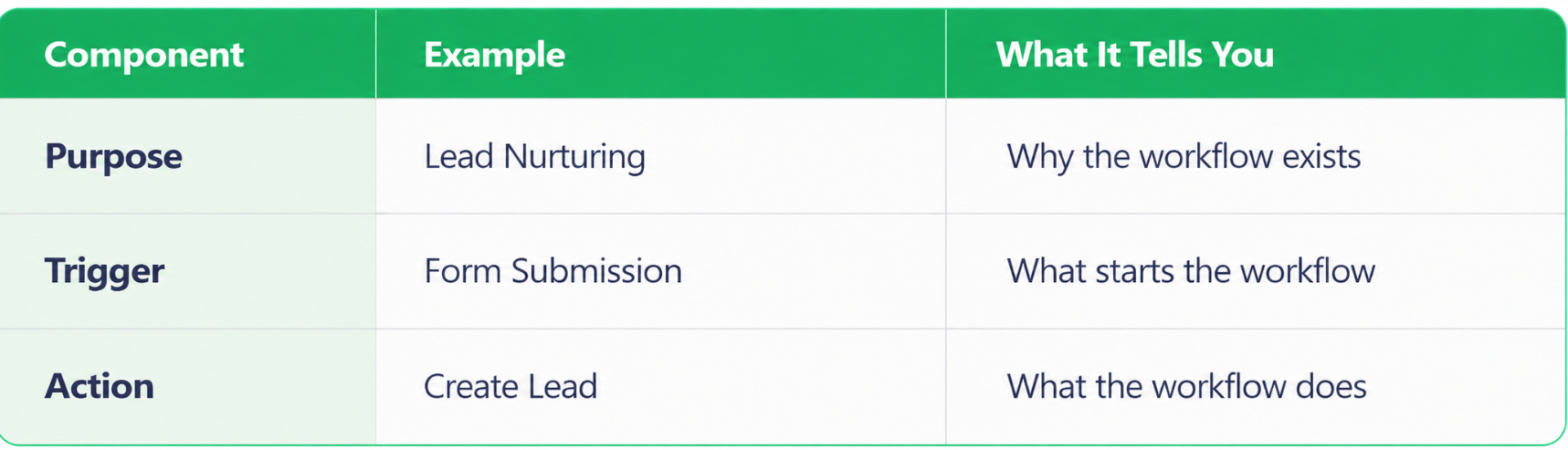
Apply the same approach to other CRM assets, adjusting the naming format to fit their purpose:
- Forms: Distinguish between evergreen and campaign-specific forms, including campaign identifiers where applicable.
- Dashboards: Use names that clearly communicate the information being reported.
- Reports: Include relevant context, such as date ranges for custom object reports when that information isn't otherwise visible.
- Lists: Use consistent naming formats that reflect their purpose and usage.
Organize CRM Assets Into Folders
Even well-named assets can be difficult to find if they're scattered throughout your CRM.
Establish a folder structure that makes sense for your business, then make sure assets are stored in the appropriate locations.
As you apply your standards, move assets that are unassigned or incorrectly organized into their proper folders.
Include the folder structure in your documented standards so new assets are organized correctly from the start.
Classify Business-Critical Workflows
Not every workflow carries the same level of risk. Changing an automation that supports an important business process can have consequences beyond the workflow itself.
We recommend assigning workflows a Business Impact classification:
- Critical: Workflows supporting important business processes that require additional care when modified.
- Regular: Standard workflows without the same level of business-critical impact.
- Testing: Workflows created for testing purposes.
Work with the relevant stakeholders to agree on these classifications, since a workflow's technical function doesn't always reveal its business importance.
Where supported, add a custom Business Impact property to workflows and include it as a required field in the workflow creation form. You can also use bulk updates to classify existing workflows.
We also recommend using a visual indicator, such as 🚨, in the names of critical workflows. This makes them easier to recognize and signals that changes should receive additional review.
Document Your CRM Organization Standards
Once you've established your naming conventions, folder structure, and workflow classifications, document the agreed rules in one accessible place.
Include the approved naming formats, examples, and any exceptions.
Once these standards are documented and agreed upon, apply them consistently to existing assets and anything new your team creates.
3. Optimize Workflows and Automate CRM Record Creation
Sales reps spend 60% of their time on non-selling tasks, including manual data entry, lead research, and switching between tools.
While CRM automation won't eliminate all that work, it can help reduce some of the manual effort. Optimizing workflows to create records with consistent names and populated properties means less information for your team to enter or correct later.
Review and Improve Existing CRM Workflows
Start with the workflow improvements identified during your CRM audit.
Focus on workflows that perform important actions, including:
- Creating records: Adding new deals, tickets, or custom object records.
- Updating properties: Changing information on existing CRM records.
- Managing associations: Connecting related records within the CRM.
Review how these actions are configured and whether different workflows handle the same process differently.
For example, two workflows might both create deals but use different naming conventions or populate different properties. These inconsistencies can leave your team with records that contain different information, even though they serve the same purpose.
How to Standardize Automated CRM Record Creation
When multiple workflows create the same type of record, they should follow consistent rules unless there's a documented reason for an exception.
Here's how to standardize the process:
- Find the record-creation action. Locate the specific step in each workflow that creates a deal, ticket, or custom object record.
- Check the record name. Make sure the workflow uses the approved naming format. For example, RevPartners recommends a deal naming structure such as [Company Name] - [Deal Type], using the corresponding CRM property values.
- Identify important properties. Determine which fields should be populated when the record is created, based on your business processes.
- Update the workflow configuration. Set the record-creation action to populate the appropriate name and property values.
- Apply the same rules across workflows. Make sure other workflows creating that object type follow the same standards, accounting for any documented exceptions.
Keep links to the relevant workflows in your CRM documentation so they're easy to locate when future changes are needed.
Automatically Populate Important CRM Properties
A workflow should populate key properties when it creates a record, provided that information is available.
The specific properties depend on the record type and what your team needs.
Examples:
- Deals: Company name, deal type, renewal date, and lead source.
- Tickets: Issue type and other relevant ticket properties.
- Custom objects: Business-specific properties required for their intended purpose.
For example, when a workflow creates a deal, it can populate the deal type and other relevant fields during creation rather than leaving someone to complete them manually afterward.
When important properties are populated from the start, your team has the information it needs without having to track down missing details later.
Not every CRM record needs to be created automatically, but for repeatable processes, automation can help ensure records are created consistently without unnecessary manual work.
4. Test Changes and Monitor CRM Data Quality
According to Validity's State of CRM Data Management report, 76% of surveyed CRM users and stakeholders said less than half of their organization's CRM data is accurate and complete.
Testing CRM changes and monitoring data quality help you verify that updates work as intended and measure whether they've improved your data. Some improvements can be measured through reporting, while others require manual checks.
Test Updated CRM Workflows
After updating workflows that create records, run test enrollments and inspect the resulting records to confirm the workflow performed the intended actions.
Check that:
- The correct record is created: The workflow creates the intended deal, ticket, or custom object record.
- The record name is correct: It follows the approved naming convention.
- Important properties are populated: The expected fields contain the correct values.
- The workflow behaves as expected: Its actions run correctly and produce the intended outcome.
Document any discrepancies, make corrections, and test again before considering the changes complete.
Manually Validate Other CRM Changes
Not every CRM improvement can be measured through reporting.
For example, a dashboard might show whether properties are being populated, but it won't necessarily tell you whether a workflow has a descriptive name or a form is stored in the correct folder.
Spot-check updated workflows, lists, forms, dashboards, and reports to confirm the agreed standards were applied correctly.
Measure CRM Data Quality Before and After Changes
79% of high-performing sales teams prioritize data hygiene, compared with just 54% of underperforming teams. That makes keeping CRM data accurate and complete worth paying attention to, but you also need a way to measure whether your improvements are working.
We recommend using an Impact Assessment Dashboard to determine whether your improvements are making a measurable difference.
Compare records created before and after your workflow updates, focusing on the percentage with important properties populated.
For example, you might measure:
- Deals: Percentage with a populated lead source or line-of-business property.
- Other records: Percentage with the expected product type.
- Tickets: Percentage with important issue-related properties completed.
If a higher percentage of newly created deals have a populated lead source after your changes, that's evidence that data completeness has improved.
You can also compare the proportion of records created manually versus automatically to understand how record-creation processes have changed.
Create a Dashboard That Highlights Missing CRM Data
While the Impact Assessment Dashboard measures improvement, a negative dashboard (also called a process adoption dashboard) shows which records still need attention.
Instead of reporting on completed fields, it identifies records missing expected information.
For example:
- Contacts without a lifecycle stage.
- Contacts without a lead status.
- Deals missing important property values.
For fields that should always be populated, the goal is to reduce these counts to zero.
Start with the most important checks. Creating too many reports can consume your CRM's reporting capacity without providing additional value.
Want to see how this works? This BLUF software tutorial walks through creating CRM metrics and using filters to identify records with missing property values. You can then use those metrics in charts and dashboards to keep an eye on data quality 👇
Identify and Address Recurring Problems
Monitoring should also help you understand why certain issues keep appearing.
For example, if newly created workflows repeatedly fail to follow naming standards, investigate whether they're temporary testing workflows or whether the naming instructions are unclear.
Document which assets are affected, what's going wrong, and the likely cause. This helps distinguish technical configuration problems from standards that aren't being followed consistently.
Use those findings to prioritize any remaining fixes and identify which problems need clearer instructions or additional team guidance.
5. Train Your Team and Maintain CRM Best Practices
According to Supered, 89% of sales teams have a defined sales process, but only 36% report that it's consistently followed. Having standards in place clearly doesn't mean everyone will follow them.
Maintaining CRM best practices requires practical training, accessible guidance, and regular reviews to keep your processes working as your business changes.
Create Short, Practical CRM Training Resources
Your team shouldn't have to dig through a lengthy document every time they need to complete a task.
We recommend creating short, task-specific training videos that show employees how to follow established CRM standards.
Focus on common tasks, such as:
- Creating workflows: How to name workflows and assign business impact classifications.
- Managing lists: How to create and organize lists according to your standards.
- Creating records: How to follow record-creation processes and populate important properties.
Short Loom videos, ideally just a few minutes long, can make these instructions easier to follow. Keep written documentation available for anyone who needs to reference the details later.
Make CRM Instructions Available Where People Need Them
Training is more useful when employees can access instructions while they're working in the CRM.
We recommend embedding guidance directly into relevant CRM screens rather than relying entirely on separate documentation.
For example, a workflow creation screen could include:
- The approved workflow naming convention and an example.
- Instructions for selecting the required Business Impact classification.
- Additional guidance for creating workflows correctly.
Tools like Supered can display contextual instruction cards within the CRM.
This gives employees the instructions they need when they're creating an asset, rather than expecting them to remember everything from an earlier training session.
Schedule Regular CRM Reviews
CRM standards need to keep up with changes in your business.
Schedule monthly or quarterly check-ins with your CRM owner to discuss changes to business processes, new requirements, outdated assets, and areas where employees are having difficulty following established standards.
Document any changes you agree on, assign responsibility for updating the guidance, and make sure the revised instructions are accessible to everyone affected.
Set recurring calendar reminders or tasks so these reviews happen consistently.
Use Team Feedback to Improve CRM Standards
The people using your CRM every day can help identify instructions that are confusing or difficult to follow.
Encourage employees to share where they're running into problems, then use that feedback to improve your documentation and processes.
For example, if the marketing team consistently struggles with naming emails, review the convention together and clarify the instructions.
The goal is to make your standards easier to follow, not add unnecessary work.
Expand Your CRM Improvements Over Time
You don't need to tackle every CRM asset at once.
Once your initial standards are working, apply the same approach to other areas, including sequences, campaigns, marketing emails, landing pages, knowledge bases, and chatbots.
Use the naming conventions, documentation, and review process you've already established as a starting point for each new asset category. Adjust the standards where necessary rather than rebuilding the entire process.
This gives your team a CRM management process that can grow and change alongside your business, without requiring another major cleanup project.
CRM Best Practices Checklist
Use this quick checklist to keep your CRM organized, accurate, and easy to manage.
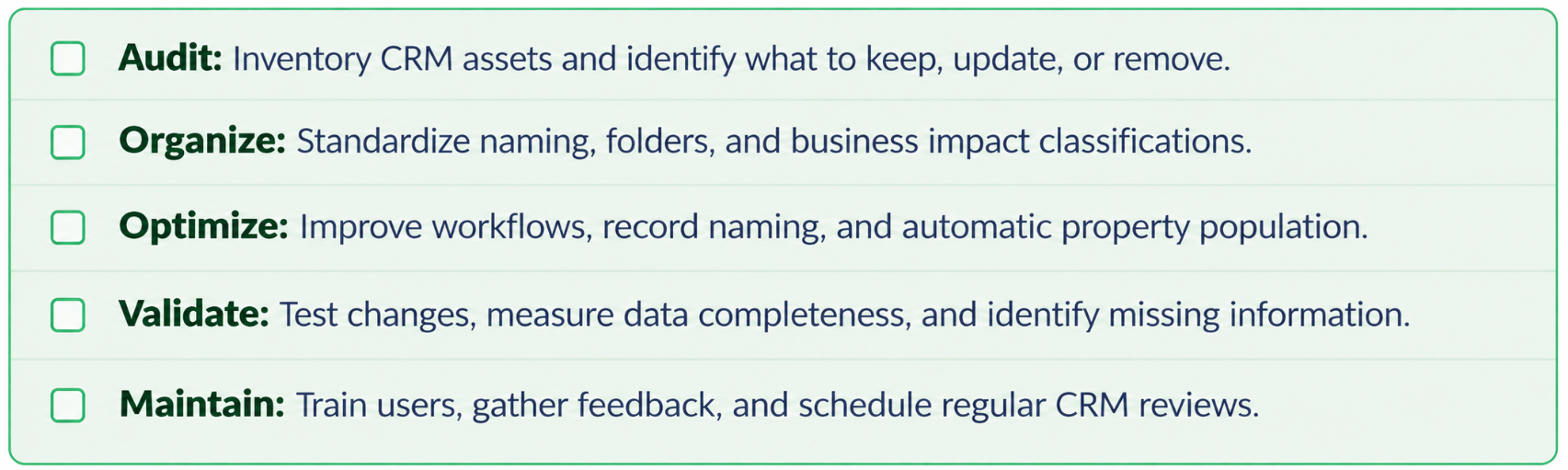
Recap: What Are the Best Practices for CRM Management?
CRM best practices help businesses keep their systems organized, data accurate, and workflows running efficiently.
Here's what matters most:
- CRM audits: Inventory existing assets and identify what needs attention.
- Asset cleanup: Decide which workflows, lists, forms, and reports to keep, update, or remove.
- Naming conventions: Use consistent formats that explain each asset's purpose.
- Folder organization: Make CRM assets easier to find and manage.
- Workflow classification: Identify business-critical automations that require additional review.
- Workflow optimization: Improve how records are created, updated, and associated.
- Automated record creation: Populate important properties and apply consistent naming rules.
- Workflow testing: Verify that changes produce the intended results.
- Data quality monitoring: Track missing information and measure improvements.
- CRM dashboards: Identify incomplete records and recurring data issues.
- Employee training: Provide short, practical instructions for common CRM tasks.
- Ongoing maintenance: Schedule regular reviews and update standards as needed.
Frequently Asked Questions About CRM Best Practices
What are the best practices for CRM management?
The five key CRM best practices are auditing existing assets, standardizing naming conventions and organization, optimizing workflows, monitoring data quality, and training employees. Together, these practices help businesses maintain accurate records, reduce manual work, improve efficiency, and keep their CRM organized as they grow.
How do you clean up and organize a CRM?
Start by auditing your existing CRM assets, including workflows, lists, forms, dashboards, and reports. Identify which assets should be kept, updated, or removed, and check for dependencies before making changes. Then establish consistent naming conventions and folder structures so employees can easily find and manage the assets they need.
How can CRM automation improve data quality?
CRM automation improves data quality by creating records with consistent names and automatically populating important properties. For example, workflows can create deals with standardized names, deal types, and lead sources instead of requiring employees to enter that information manually. Testing these workflows helps ensure records are created accurately and consistently.
How do you measure CRM data quality?
CRM data quality can be measured by tracking the accuracy and completeness of important record properties. Businesses can use dashboards to monitor missing information, such as contacts without lifecycle stages or deals without lead sources. Comparing data completeness before and after workflow improvements helps determine whether CRM optimization efforts are working.
How often should you audit and maintain your CRM?
Businesses should schedule monthly or quarterly CRM reviews to identify outdated assets, evaluate workflow performance, and address recurring data quality issues. Regular reviews should also include employee feedback, updates to naming conventions, and changes to business processes. Ongoing maintenance helps prevent CRM clutter and reduces the need for another major cleanup project.