.png)
HubSpot Marketing Hub onboarding helps businesses configure the platform around how they capture, nurture, qualify, and hand off leads. HubSpot’s direct onboarding is primarily guidance-led, while a Solutions Partner can provide hands-on implementation by building workflows, lead management, scoring, routing, attribution, dashboards, and other infrastructure that connects marketing activity to pipeline and revenue.
What is HubSpot Marketing Hub and why do you need a smart onboarding plan?
It should come as absolutely no surprise to anyone that HubSpot has a Marketing Hub. Why? Because HubSpot founders Brian Halligan and Dharmesh Shah literally wrote the book on inbound marketing.

Although today HubSpot is a powerhouse in the CRM world, it was their marketing automation platform that initially drew many people to them. From day one, HubSpot has been the place to turn for marketing automation, innovation, and transformation.
With tailored options like Marketing Hub Professional Onboarding, HubSpot Marketing Enterprise Onboarding, and HubSpot Enterprise Onboarding, businesses can choose the level that best fits their needs for scale and growth. In fact, companies utilizing HubSpot Marketing Hub can see a staggering 505% ROI after three years, highlighting the long-term value of investing in this platform.
HubSpot’s Marketing Hub allows you to store all of your marketing tools and data in one place. With features such as blog, email marketing, SEO, social media management, and ad tracking and management, it's the go-to platform for any company that is serious about lead capture, lead nurture, and lead conversion. Businesses experience an impressive 129% increase in inbound leads generated after just 12 months of using Marketing Hub, demonstrating the platform's effectiveness in attracting new prospects.
Key Takeaways
- Marketing Hub gives you the tools to capture leads, automate campaigns, track attribution, and connect marketing activity to revenue
- HubSpot onboarding primarily guides your team through setup and platform adoption
- A HubSpot Solutions Partner can take a more hands-on role by actually building the workflows, reporting, lead management, attribution, and infrastructure for you
- RevPartners offers three Marketing Hub implementation paths that launch in 14–30 days, depending on how much your team needs built
- The right option depends on whether your team mainly needs guidance or needs someone to help build the system
How do you build your HubSpot Marketing Hub Onboarding plan for long-term success?
Buying Marketing Hub is the easy part.
Getting it configured around the way your team actually generates, qualifies, nurtures, and hands off leads is where onboarding and implementation come in.
When you launch Marketing Hub, you generally have two paths:
-
work directly with HubSpot for onboarding guidance
-
work with a HubSpot Solutions Partner for a more hands-on implementation.
While HubSpot can guide your team through the platform and the setup process, a partner can go further by helping build the system itself, from tracking and domains to lead routing, nurture automation, attribution, dashboards, and lifecycle architecture.
And a partner-led implementation doesn’t necessarily mean a months-long project. RevPartners’ current Marketing Hub implementation options range from 14 days for foundational setup to 30 days for more advanced builds.
Let’s look at what each approach actually involves.

HubSpot Marketing Hub Onboarding: What You Get Working Directly With HubSpot
Working directly with HubSpot makes sense for teams that primarily need guidance getting familiar with the platform and configuring the essentials.
HubSpot’s onboarding team knows the product and can walk your team through setup, best practices, and the core tools you’ll need to get started.
Where the difference starts to show is in execution. Direct onboarding is generally more guidance-led, meaning your team remains responsible for more of the actual building and configuration. If you need someone to create workflows, architect lead management, build attribution reporting, or configure Marketing Hub around a more complex GTM process, a Solutions Partner may be the better fit.
First, let’s look at the types of areas covered during HubSpot onboarding.
Phase 0: HubSpot CRM Onboarding and Technical Setup Essentials
HubSpot actually refers to this as “Phase 0” because it's really all about getting familiar with the platform itself and its foundations. This phase is less about getting into the real meat of the Marketing Hub, and more about creating an understanding of how the software works so that everyone on the team is comfortable as the onboarding process progresses.
For anyone who has painted a room before, this stage is sort of like taping the trim, measuring, and laying down drop cloths before the actual painting begins. It's all about setting your team up for success down the road.
Some of the areas you’ll receive guidance on in this stage include:
- Connection of subdomains and configuration of settings
- Installation of the HubSpot tracking code
- Setting up your email sending domain
- The importing of contacts, companies, deals, tickets, and notes
- The importing of your marketing opt-out lists
- Configuration of email types
- Connecting your social accounts
- Consideration of integrations
3 Goals That Guide Every Marketing Hub Professional Onboarding Plan
The following three stages will involve the completion of three primary goals. These goals can vary from company to company, but in general they tend to revolve around leads and automation.

Marketing Hub Professional Onboarding Goal #1: Capture and Convert Leads
Devising a strategy to successfully capture and convert leads is the core of any good marketing plan.
If you choose to onboard with HubSpot, one of your three primary goals should be, in some way, related to this sample. Here’s what to expect with a goal similar to this one:
- The creation of personas to gain a better understanding of the variation you will see in your customer database
- Exploration of forms and pop-up forms
- Creation of customer properties to help qualify leads when filling out forms
- Lead scoring setup
- Using your own qualifications to define each Lifecycle Stage. HubSpot Marketing Professional Onboarding emphasizes the customization of these lifecycle stages to optimize lead management and conversion. What's more, organizations typically see a 40% increase in deals created when they leverage HubSpot Marketing Hub effectively, emphasizing the importance of a well-structured onboarding process.
Marketing Hub Onboarding Goal #2: Engage and Nurture Leads Effectively
A good second goal is one that revolves around the continued care of your leads. The degree to which you engage and nurture these leads will be key in determining the upward trajectory of your business. A goal revolving around this concept would receive guidance on the following:
- Creation of a nurturing process flow map
- Defining lifecycle stages so that contacts go through different nurturing tracks depending on their stage
- The creation of your first welcome flow series for a new lead
Marketing Hub Enterprise Onboarding Goal #3: Automate and Personalize Campaigns
Do you want to streamline your workflows, increase efficiency, and grow your revenue faster? If not, then...that’s strange. If you do want those things, then you want a goal related to automation as part of your HubSpot onboarding process. Here’s what to expect when receiving guidance on a goal like this:
- Automating manual tasks in HubSpot
- Developing workflows
- Exploration of smart content
- Connection of your social and ad tools (automating tasks)
- Building target lists by using custom properties
Completing Your HubSpot Marketing Onboarding Plan and Setting Future Goals
Following the completion of your three selected primary goals, your HubSpot onboarding plan is essentially complete. During this period, HubSpot will work with you to determine appropriate future goals to ensure that you are getting the most value out of your Marketing Hub purchase.

HubSpot vs. a Solutions Partner: What’s the Difference?
HubSpot and a Solutions Partner can both help you get started with Marketing Hub, but they typically play different roles.
Think of HubSpot onboarding as more guidance-led and partner implementation as more build-led.
If your team is comfortable doing much of the configuration itself, HubSpot’s onboarding approach may be enough. If you need someone to actually help architect and build the system around your GTM motion, a partner can take more of that work off your plate.
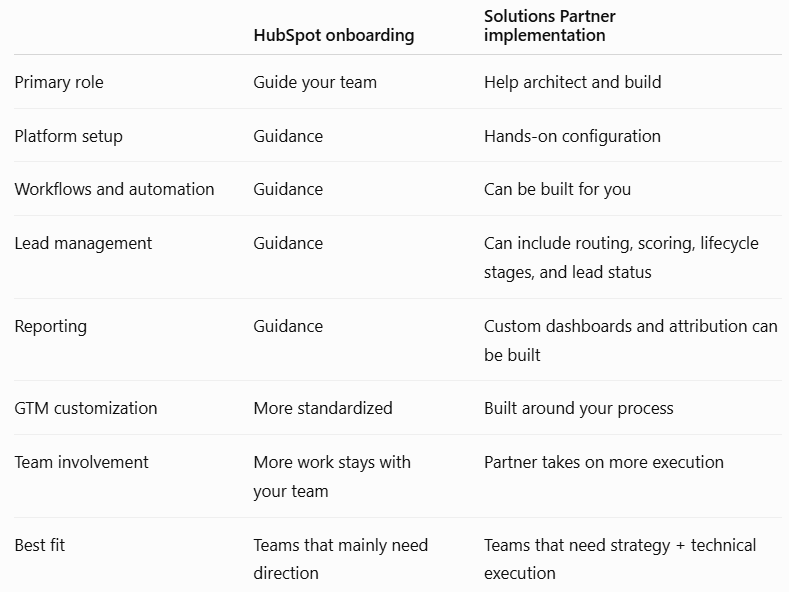
A Partner Can Do More of the Building for You
The biggest difference isn’t simply that a partner “saves time.” It’s who is responsible for turning the strategy into a working HubSpot system.
With a hands-on implementation partner, your team doesn’t have to figure out every workflow, property, report, routing rule, and configuration on its own.
For example, a Marketing Hub implementation can include everything from tracking codes, sending domains, forms, email templates, and contact segmentation to nurture workflows, lead routing, attribution reporting, dashboards, lead scoring, and buyer intent configuration.
Your team still needs to provide the business context and make the important decisions. The partner handles more of the technical execution required to make those decisions work inside HubSpot.
What Does Partner-Led Marketing Hub Implementation Include?
“Partner-led implementation” can mean a lot of different things, so look at the actual scope before choosing one.
At RevPartners, for example, Marketing Hub implementation is split into three paths based on how much infrastructure and automation a team needs.
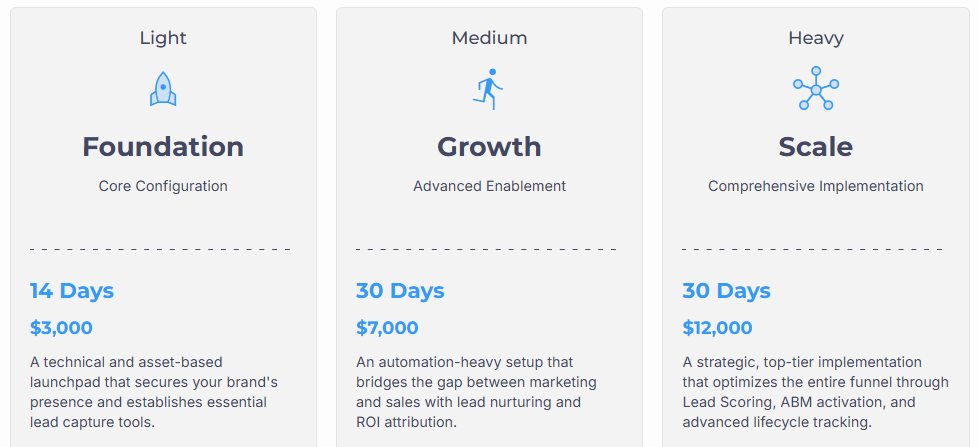
Foundation — 14 days: Built for teams that need the Marketing Hub fundamentals in place quickly, including technical setup, tracking, domains, data privacy, forms, email templates, segmentation, basic dashboards, and platform training.
Growth — 30 days: Adds more automation and sales alignment, including nurture campaigns, lead management, Sales Workspace setup, event ROI tracking, and contact/deal source attribution.
Scale — 30 days: Goes deeper into the full funnel with lead scoring, custom lifecycle and lead status architecture, target accounts, buyer intent, and a dedicated lead management dashboard.
The goal is to build the level of infrastructure your GTM motion actually needs.
What Can a Marketing Hub Implementation Partner Build for You?
The exact scope depends on the partner and what your business already has in place, but a hands-on Marketing Hub implementation can go well beyond basic account setup.
That can include:
- Tracking, domains, branding, analytics, and privacy settings
- Contact and company imports
- Forms, emails, landing pages, and campaigns
- Contact segmentation
- Lifecycle stages and lead status automation
- Nurture workflows
- Lead routing and assignment
- Lead scoring
- Target accounts and buyer intent
- Contact, deal, and event attribution
- Marketing KPI and lead management dashboards
- Admin and end-user training
A good implementation shouldn’t leave your team dependent on the partner, either. The build should come with training so your admins and users understand how the system works and how to keep using it once implementation is complete.
That’s really the difference between onboarding guidance and hands-on implementation. One helps your team understand what to do. The other helps turn it into a working system.
How to Decide Which Marketing Hub Onboarding Path You Need
The right choice really comes down to how much your team wants to own internally.
Work directly with HubSpot if your team mainly needs guidance, has people available to handle the configuration, and already knows how your marketing and lead-management processes should work.
Work with a Solutions Partner if you need help translating your GTM process into HubSpot, building the technical infrastructure, connecting marketing activity to pipeline and revenue, or getting more advanced automation and reporting live without making your internal team build everything themselves.
And don’t choose a partner based on tier alone. Look at what they actually implement, how technical their team is, what kind of training they provide, and whether they understand the revenue process behind the software.
Where RevPartners Fits
If your team needs more hands-on help turning its GTM process into a working Marketing Hub system, that’s where RevPartners comes in.
We approach Marketing Hub as revenue infrastructure, not an isolated marketing tool. That means building around the way leads enter your system, move through the funnel, get handed to Sales, and ultimately turn into pipeline and revenue.
RevPartners has completed 1,000+ CRM implementations, earned 500+ five-star HubSpot Directory reviews, and was the fastest partner to reach HubSpot Elite status.
Depending on how much your team needs built, Marketing Hub implementations can be launched in as little as 14 days, with more advanced Growth and Scale implementations completed in 30 days.
The goal isn’t simply to get Marketing Hub turned on. It’s to leave you with the infrastructure, automation, reporting, and training your team needs to get real value from it.
See how RevPartners implements Marketing Hub →
Recap: How Does HubSpot Marketing Hub Onboarding Work?
To get Marketing Hub up and running successfully, teams should focus on:
- Choose the right onboarding path: HubSpot onboarding is generally more guidance-led, while a Solutions Partner can take a more hands-on role in actually building and configuring Marketing Hub around your GTM process.
- Get the technical foundation right: Connect domains, install tracking, configure your email sending domain, import CRM data and opt-out lists, connect social accounts, and evaluate necessary integrations before moving into more advanced marketing automation.
- Build around lead capture and conversion: Set up forms, properties, personas, lead qualification, scoring, and lifecycle stages so Marketing Hub reflects how your business actually identifies and manages potential customers.
- Create a clear nurturing process: Define how leads should move through lifecycle stages and build nurturing experiences that keep them engaged until they're ready for the next step.
- Automate repetitive marketing work: Use workflows, lists, smart content, and connected advertising and social tools to reduce manual work while keeping campaigns relevant to each audience.
- Connect Marketing to Sales: Marketing Hub shouldn't operate as a separate marketing system. Lead management, routing, lifecycle stages, attribution, and reporting should create a clear path from marketing activity into pipeline and revenue.
- Decide how much your internal team wants to build: If your team already understands its marketing processes and has the resources to configure HubSpot, direct onboarding may be enough. If you need help translating those processes into the CRM, partner implementation may be a better fit.
- Evaluate the actual implementation scope: Don't assume every partner implementation is the same. Look at what will actually be built, including forms, emails, workflows, routing, scoring, attribution, buyer intent, dashboards, and other infrastructure.
- Match implementation depth to your GTM needs: RevPartners, for example, offers Foundation, Growth, and Scale implementations ranging from 14 to 30 days, with progressively deeper automation, lead management, attribution, scoring, and reporting.
- Make training part of the implementation: A good build shouldn't leave your team dependent on whoever implemented it. Admin and end-user training should help your team understand what was built and how to manage it moving forward.
- Choose a partner based on capability, not just tier: Evaluate technical expertise, implementation scope, training, and the partner's understanding of the revenue process behind Marketing Hub rather than relying on HubSpot partner status alone.
Frequently Asked Questions About HubSpot Marketing Hub Onboarding
What is HubSpot Marketing Hub onboarding?
HubSpot Marketing Hub onboarding helps teams get familiar with the platform, configure the essentials, and start using its marketing tools. It can cover technical setup, lead capture, nurturing, automation, lifecycle stages, and other foundational areas depending on your goals.
What is the difference between HubSpot onboarding and implementation?
HubSpot onboarding is generally more guidance-led, while partner-led implementation is more build-led. With implementation, a Solutions Partner can take on more of the actual configuration, including workflows, lead routing, attribution, reporting, and other technical infrastructure.
Should I onboard with HubSpot or a HubSpot Solutions Partner?
Work directly with HubSpot if your team mainly needs guidance and has the resources to handle much of the configuration internally. A Solutions Partner may be a better fit if you need help translating your GTM process into HubSpot and actually building the automation, reporting, and infrastructure.
What does a HubSpot Marketing Hub implementation include?
A Marketing Hub implementation can include technical setup, data imports, forms, emails, segmentation, lifecycle automation, nurture workflows, lead routing, lead scoring, attribution, dashboards, and training. The exact scope depends on your existing setup and how much you need the partner to build.
How long does HubSpot Marketing Hub implementation take?
Implementation time depends on how much needs to be built. RevPartners offers a foundational Marketing Hub implementation in 14 days, while its more advanced Growth and Scale implementations are designed to be completed in 30 days.
-1.png)

.png)