
SaaS tools for startups are cloud-based platforms that help small teams manage communication, projects, marketing, sales, customer support, HR, and revenue operations without heavy upfront infrastructure costs. The best startup SaaS stack prioritizes integrated, scalable tools like HubSpot, Slack, ClickUp, Clay, and Rippling that centralize data, automate manual work, and support growth without unnecessary complexity.
Software-as-a-Service (SaaS) tools have become increasingly popular among startups due to their affordability, flexibility, and scalability. Let’s take a look at their importance, how to choose the right ones, and how to implement them effectively.
Key Takeaways
- Communication: Use Slack for daily decisions and quick huddles, and Google Meet for one-click video calls and AI-powered note-taking.
- Project Management: ClickUp acts as your "all-in-one" home for tasks and docs, while Asana is the powerhouse for tracking complex timelines and keeping the team accountable.
- Marketing & Sales: HubSpot is your central base for tracking every customer move, while Clay acts as an AI research assistant to find leads and write personalized icebreakers.
- Customer Support: HubSpot Service Hub + Breeze AI allows a tiny team to offer 24/7 support by using AI agents to answer questions based on your actual help docs.
- HR & Learning: Rippling automates everything from payroll to setting up new laptops, and WorkRamp keeps your team growing with easy-to-build training programs.
- Strategy & RevOps: Use Miro to brainstorm plans on a digital whiteboard, PandaDoc to get contracts signed fast, FirstTouch to manage LinkedIn outreach, and QuotaPath to track sales commissions automatically.
Why are SaaS tools important for startups?
SaaS refers to cloud-based software that's hosted and maintained by a third-party provider. Unlike traditional software installations, SaaS tools can be accessed through a web browser, eliminating the need for downloading and installing software on individual devices. This flexibility allows startups to focus on their core business strategies and goals without the hassle of managing updates, maintenance, and infrastructure.
SaaS tools offer subscription-based pricing models, which allow startups to pay for the services they need without incurring heavy upfront costs.
This pay-as-you-go model enables startups to scale their operations as they grow, without the burden of investing in expensive software licenses or hardware infrastructure.
Also, SaaS tools often come with built-in security features, ensuring that startups can protect their data and sensitive information without having to invest in additional cybersecurity measures. This peace of mind is invaluable for startups looking to build trust with their customers and partners while complying with data protection regulations.

What categories of SaaS tools do startups need?
What are the best SaaS tools for startup communication and collaboration?
The goal for any small team is to spend less time talking about work and more time actually doing it. You don't need a dozen different apps to stay in touch, you need a few that work well together so you aren't constantly repeating yourself or digging through email threads.
Slack

Slack is the go-to because it’s moved past just being a place to send quick pings. It’s really where the majority of your daily decisions are made and documented.
- The Rundown: It’s where you have quick chats, share files, and get automated updates from your other apps like HubSpot.
- Key Features: It now has AI-generated channel recaps that summarize long threads in seconds. There's also a feature called Canvas for taking notes right inside a chat, and Huddles for jumping on a quick call without needing a link.
- Benefits: It keeps everyone on the same page without needing a formal meeting for everything. You can solve a problem in a two-minute Huddle that would've taken twenty emails to figure out.
- Use Cases: Use a dedicated announcements channel to replace all-hands emails, or set up automated alerts so your sales team knows the second a new lead hits your website.
Google Meet

While people used to go back and forth between Zoom and Google Meet, Meet has become the favorite for startups because it’s just easier for your team and, more importantly, your customers.
- The Rundown: It’s built directly into your email and calendar. There’s no software for your clients to download and you’ll never have that awkward moment where you're late to a pitch because your meeting app needs an update.
- Key Features: It uses Gemini AI to take notes for you and automatically list out action items. It also has high-quality screen sharing and real-time captions if you're talking to someone in another language.
- Benefits: It’s usually already included in your Google Workspace bill, so it’s one less thing to pay for. It’s reliable, fast, and works on any phone or laptop with a web browser.
- Use Cases: Perfect for quick internal syncs where you need an automatic transcript, or for external sales pitches where you want the guest to be able to join with just one click.
What are the best SaaS tools for project management in startups?
The old way of managing projects, just moving cards around a board, doesn't really cut it anymore. Startups need tools that don't just list tasks but actually help get them done. Most teams are moving toward platforms that keep your docs, goals, and tasks all in one place.
ClickUp

ClickUp has become a favorite for startups because it can replace three or four other tools. It’s flexible enough to be a simple to-do list for a founder or a complex board for a dev team.
- The Rundown: ClickUp is a massive productivity platform where you can manage tasks, write docs, set goals, and track your time in a single app. It’s designed to be the one place your team goes to see what’s next on their plate.
- Key Features: You can view your work however you like, whether that’s a list, a board, a calendar, or a mind map. It also has built-in AI that can summarize long task descriptions or even write a project brief for you based on a few notes.
- Benefits: It puts an end to searching for files because your documents are attached directly to your tasks. It also saves you money since you can stop paying for separate apps for docs or goal tracking.
- Use Cases: Use it to manage your product roadmap, store your company’s internal handbook (SOPs), and track weekly goals for every department in one dashboard.
Asana

If your startup has complex workflows with strict deadlines, Asana is still the powerhouse for keeping people accountable.
- The Rundown: Asana is built specifically for project tracking. It’s great at showing exactly who's doing what and when it’s due, so important details don't get missed during a big launch
- Key Features: It has excellent Timeline views that show how one task depends on another. If a designer is running late, you can instantly see how that pushes back your entire marketing launch.
- Benefits: It's incredibly easy to use and very intuitive. You don’t need a degree in project management to figure it out, which is perfect for new hires.
- Use Cases: Ideal for managing high-stakes marketing campaigns, coordinating product launches with multiple moving parts, and onboarding new employees with a standardized checklist.
What are the best SaaS tools for startup marketing and sales?
Marketing and sales shouldn't feel like two different worlds. The best tools are the ones that let your marketing team pass a lead over to sales without losing all the helpful details along the way.
HubSpot

HubSpot is the go-to for startups because it scales with you, starting as a simple way to track contacts and growing into a full system that manages your entire customer journey.
- The Rundown: HubSpot tracks every move a person makes with your brand, like if they clicked a link in your newsletter, checked out your pricing page, or had a chat with a sales rep.
- Key Features: It has very easy tools for building emails and managing your website. The best part is the automation; you can set it up to notify a sales rep the second a big lead downloads one of your guides.
- Benefits: It stops you from having to log into five different apps just to see how your business is doing. Since everything lives in one place, your reports actually make sense and your data stays clean.
- Use Cases: This is perfect for startups that want to grow fast without getting disorganized. Use it to build landing pages, automate your follow-ups, and keep an eye on your entire sales funnel in one dashboard.
Clay

Generic sales emails don't really work anymore. Clay has become a favorite for startups because it acts like a high-speed research assistant that finds the right people for you to talk to and tells you exactly what to say to them.
- The Rundown: You give it a list of companies you like, and it goes out to the internet to find out who works there, what they've been posting on LinkedIn, and even what technology they use at their office.
- Key Features: It has an AI tool that can browse the web to answer specific questions about a lead. It also tracks things like new funding rounds or job changes so you know exactly when to reach out.
- Benefits: It lets a tiny team do the work of a huge sales department. Instead of spending hours manually researching people, you can automate that part and only spend your time having real conversations with people who are a good fit.
- Use Cases: Use it to build highly targeted lists of new prospects, find verified email addresses for anyone, and make sure your sales team has a great icebreaker ready for every single call.
What are the best SaaS tools for customer support in startups?
The goal for any startup is to resolve issues instantly without having to hire a massive team. The most efficient way to do this is by combining your customer data with an AI that actually knows how to use it.
HubSpot Service Hub + Breeze AI


HubSpot is the home base for your support team, and Breeze is the AI engine that lives inside it. Together, they allow a tiny startup to provide the kind of 24/7 service that usually requires a global department.
- The Rundown: Service Hub is where you manage your tickets, shared inbox, and help articles. Breeze is the AI that sits on top of that data, answering customer questions and automating all the manual data entry that usually slows people down.
- Key Features: You get a Customer Agent that chats with people on your website using your own help docs to solve problems. It also includes a Data Agent that constantly cleans up your contact info and a Summary tool that recaps long customer histories for your human reps in seconds.
- Benefits: Your sales and support data are in one place. The AI doesn't just guess, but instead uses real customer history to provide answers. This saves you money because you don't need a separate chatbot subscription or a large night-shift team.
- Use Cases: Use the AI to handle routine how-to questions and order status updates instantly. Meanwhile, your human team uses the ticketing system to focus on high-value customers who need a more personal touch.
What are the best SaaS tools for HR in startups?
HR isn't just about filing paperwork or making sure people get paid. For a startup, it is about moving fast and keeping your team happy without getting bogged down in manual work. You need tools that handle the heavy lifting of compliance and payroll so you can focus on building your company culture.
Rippling

Rippling has become a top pick for startups as it handles not only HR, but also IT and finance. It's designed for teams that want to automate the entire process of hiring and managing employees from a single screen.
- The Rundown: Rippling is a massive platform that connects your payroll and benefits to your company software and hardware. When you hire someone, you can set up their pay, their health insurance, and even their work laptop all in one go.
- Key Features: It has incredible automation. If an employee moves to a different state, Rippling can automatically update their tax info and compliance forms. It also has a built-in app store that syncs with almost every other tool you use.
- Benefits: It saves you a huge amount of time on onboarding. You can go from hiring someone to having them fully set up with their computer and software access in about 90 seconds.
- Use Cases: Perfect for startups that hire people in different states or countries and want a single place to manage payroll, software permissions, and hardware without losing their minds.
WorkRamp

As your startup grows, you need a way to get new hires up to speed quickly. WorkRamp is an all-in-one learning platform that helps you build training programs that actually stick.
- The Rundown: WorkRamp is a learning management system that handles everything from initial onboarding to ongoing professional development. It's built to help your team learn the skills they need to help the company scale.
- Key Features: It features a very easy-to-use course builder and uses AI to help you create training content faster. You can also create "academies" for your customers or partners to teach them how to use your product.
- Benefits: It ensures everyone on your team is getting the same high-quality training. It also tracks who has completed their compliance training, which is a huge help during audits.
- Use Cases: Great for startups that need to ramp up sales teams quickly, manage mandatory compliance training, or provide a professional learning experience for their customers.
What are the best SaaS tools for strategy and revenue operations in startups?
These are the tools that help you plan your strategy, close deals faster, stay relevant on social media, and ensure your team is paid accurately and on time.
Miro
- The Rundown: A giant digital whiteboard where your whole team can brainstorm and draw out plans together in real-time.
- Key Features: Ready-made templates for planning, easy-to-build flowcharts, and AI that helps group your ideas together.
- Benefits: It stops people from working in their own little bubbles and makes sure everyone can see the big picture.
- Use Cases: Use it to draw out your growth plans, brainstorm new ideas for your app, or map out exactly how a customer goes from seeing an ad to buying your product.
PandaDoc


- The Rundown: A way to send professional proposals and contracts that people can actually sign on their phones or computers.
- Key Features: Legal e-signatures, built-in price lists, and a way to see exactly when someone opens your document.
- Benefits: No more messy email attachments. It looks professional and helps you get a signature (and a payment) much faster.
- Use Cases: Send out sales proposals, handle new hire paperwork, or get signatures on privacy agreements before a big meeting.
FirstTouch
- The Rundown: A tool that helps your sales team stay active on LinkedIn without it feeling like a second full-time job.
- Key Features: Reminders to reach out to people, AI to help you write better messages, and a way to track all your social media activity in your main system.
- Benefits: It takes the guesswork out of social media. You’ll finally know which LinkedIn messages are actually turning into real business meetings.
- Use Cases: Automatically remind your team to comment on a prospect's post, send out personalized invites to new leads, or track which messages work best.
QuotaPath
- The Rundown: A clear dashboard that shows your sales team exactly how much money they are making in bonuses and commissions.
- Key Features: Automatic math for payouts, a "what-if" tool to see how much a new deal will pay, and a progress bar for sales goals.
- Benefits: It builds trust. When your team can see exactly what they’re earning the second they close a deal, they stay excited and focused on the next one.
- Use Cases: Give your team a live view of their monthly pay, calculate complex bonuses automatically, and send the final numbers to your finance team for easy payouts.
Recap: What SaaS Tools Do Startups Need to Scale?
To build an effective SaaS stack, startups should focus on:
- Communication and collaboration: Use Slack for day-to-day communication and quick collaboration, while Google Meet supports video meetings, transcripts, AI-powered notes, and action items.
- Project management: Use ClickUp to centralize tasks, documentation, goals, and project work, or Asana when your team needs more structured timelines, dependencies, and accountability.
- Marketing and sales: Make HubSpot the central CRM for customer data, marketing automation, sales activity, and reporting, then use Clay to automate prospect research, enrichment, buying signals, and personalized outbound.
- Customer support: Combine HubSpot Service Hub with Breeze AI to manage tickets, customer information, knowledge content, and AI-powered support without requiring a large service team.
- HR and employee development: Use Rippling to automate payroll, benefits, IT, and employee onboarding, while WorkRamp helps standardize training and professional development as headcount grows.
- Strategy and RevOps: Use tools such as Miro for planning, PandaDoc for proposals and contracts, FirstTouch for LinkedIn outreach, and QuotaPath for commission management and visibility.
- Prioritize integration over tool count: Choose software that works with your existing systems, reduces manual work, centralizes important data, and can continue supporting the business as complexity increases.
Frequently Asked Questions About SaaS Tools for Startups
What are the best SaaS tools for startups?
The best SaaS tools for startups typically include platforms for CRM, communication, project management, marketing, customer support, HR, and revenue operations. Popular choices include HubSpot, Slack, Google Meet, ClickUp, Asana, Clay, Rippling, WorkRamp, Miro, PandaDoc, and QuotaPath because they help small teams scale efficiently without adding unnecessary complexity.
How do startups choose the right SaaS tools?
Startups should prioritize tools that solve immediate business needs, integrate well with existing systems, and can scale as the company grows. Choosing platforms that reduce manual work, centralize data, and support multiple departments often delivers the greatest long-term value.
Why is having a single source of truth important?
A single source of truth ensures every team works from the same customer and business data. Instead of marketing, sales, support, and leadership relying on different spreadsheets or disconnected systems, everyone makes decisions using accurate, up-to-date information, reducing errors and improving collaboration.
What SaaS categories should every startup have?
Most startups benefit from software for customer relationship management (CRM), communication, project management, marketing automation, sales enablement, customer support, HR, finance, and analytics. Building an integrated tech stack helps eliminate data silos while improving operational efficiency across the business.
When should a startup invest in more advanced SaaS tools?
Startups should expand their software stack when manual processes begin slowing growth, customer data becomes difficult to manage, or teams struggle with disconnected systems. Investing in scalable platforms early can reduce future migration costs and provide a stronger operational foundation as the business grows.
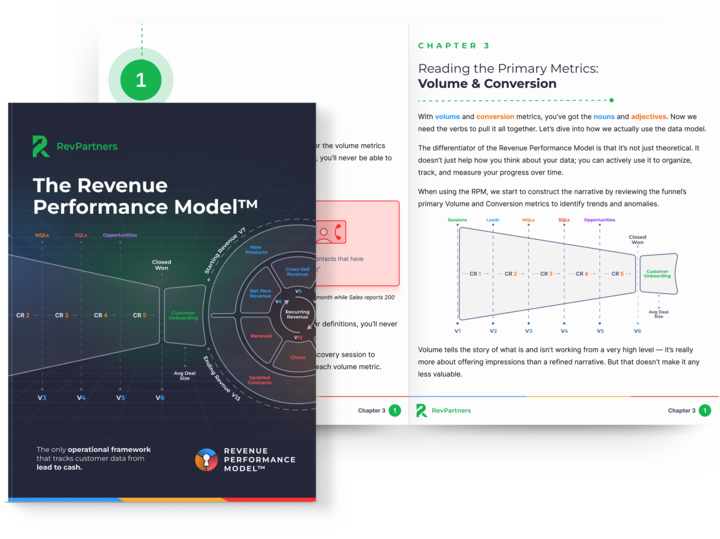
The Revenue Performance Model
Do you want to track the entire revenue journey in your CRM so you can see what's broken, why it happened, and where to fix it?
Download the Revenue Performance Model HERE
-2.png)
-4.png)
-1.png)