-4.png)
HubSpot and Marketo are two of the biggest names in marketing automation, but they're built with different priorities in mind. HubSpot connects marketing, sales, and customer data in one platform, while Marketo focuses on advanced B2B marketing automation. Both have their strengths, but which one makes more sense for your business?
Marketing automation used to be mostly email and lead nurturing. But now 67% of B2B buyers prefer a sales-rep-free experience, and more people weigh in on every purchase. That leaves marketing teams with a lot more to figure out, like how to reach buyers researching on their own and showing how marketing contributes to revenue. And none of that works without a much tighter relationship with sales.
HubSpot and Marketo both say they can handle all of that, so here's how they stack up side by side. You'll see what each one does well, where it falls short, and what you end up paying for it. We also dig into how each one handles automation, AI, and integrations, and how much work it takes to get your team using it.

Key Takeaways
- Platform focus: HubSpot puts marketing, sales, and CRM in one platform. Marketo focuses on advanced B2B marketing automation rather than the full customer lifecycle.
- Automation and AI: Both are strong here. The real difference is how they're set up and how much work it takes to manage them across teams.
- CRM: HubSpot comes with its own CRM and also integrates with Salesforce. Marketo doesn't have a built-in CRM, so it connects to an outside system like Salesforce or Microsoft Dynamics.
- Pricing and complexity: HubSpot publishes its prices and offers several tiers. Marketo requires a custom quote, and you'll typically need someone with specialized experience to manage it.
- Best fit: HubSpot works well if you want connected tools and a platform that's easier to manage day to day. Marketo makes more sense if you run complex marketing programs and have a dedicated ops team to handle them.
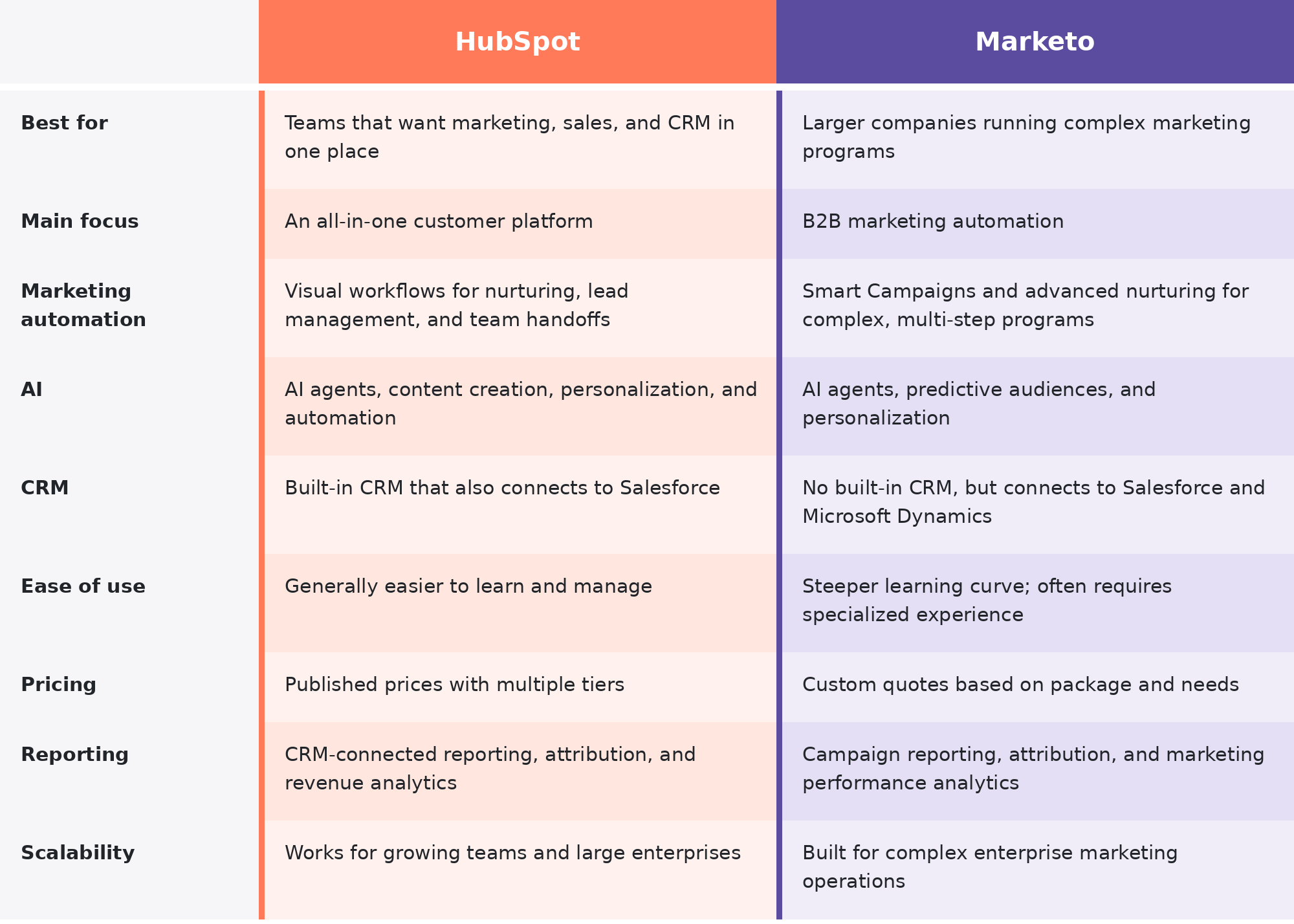
HubSpot vs. Marketo at a Glance
The biggest difference is that HubSpot ties marketing into the rest of your revenue operations in one platform. Marketo is strong at marketing automation, but you'll generally need other systems to cover the full customer lifecycle.
Considering a move from Marketo to HubSpot?
Get a free migration scoping session with RevPartners to understand what's involved before making the switch.

What's the Difference Between HubSpot and Marketo?
HubSpot and Marketo are both B2B marketing automation platforms, but they're built for different jobs. HubSpot is part of a bigger customer platform that ties marketing, sales, and service together. Marketo focuses on advanced marketing automation and relies on other systems to connect the rest of the customer journey.
What Is HubSpot Marketing Hub?
HubSpot Marketing Hub is marketing automation software that helps you bring in leads, run campaigns, nurture prospects, and see what's working. It covers everything from email and landing pages to lead scoring, personalization, and automated workflows.
Here's what you get with it.
- Email marketing: Create, personalize, test, and automate email campaigns.
- Marketing automation: Build workflows for lead nurturing, follow-ups, and lead routing.
- Lead management: Segment contacts, score leads, and track engagement throughout the buying journey.
- Campaign management: Organize campaigns and track performance across channels.
- AI and reporting: Use AI tools to speed up marketing tasks and reports to measure results.
HubSpot's biggest advantage is how it connects to HubSpot Smart CRM. Marketing and sales can work from the same contact records, customer activity, and lifecycle data instead of constantly piecing together information from separate systems.
Marketing Hub also links up with Sales Hub, Service Hub, Content Hub, and Data Hub. That means you can run more of the customer journey in one place, from the first marketing touch to a closed deal and ongoing support.
What Is Adobe Marketo Engage?
Adobe Marketo Engage is an enterprise B2B marketing automation platform that's part of Adobe Experience Cloud. It's made for organizations running complex campaigns, large prospect databases, and detailed lead nurturing programs.
Here's what you get with it.
- Smart Campaigns: Automate marketing activity using detailed triggers, filters, and actions.
- Lead nurturing: Build multi-step engagement programs around prospect behavior and interests.
- Lead scoring: Qualify prospects using demographic and behavioral data.
- Account-based marketing: Target specific accounts and buying groups with coordinated campaigns.
- AI and reporting: Use predictive insights and AI tools for targeting, personalization, and campaign analysis.
Marketo connects to CRMs like Salesforce and Microsoft Dynamics so your marketing activity lines up with your sales data. Unlike HubSpot, it doesn't have a built-in CRM, so you'll need a separate system to manage your pipeline and customer relationships.
Since it's part of Adobe Experience Cloud, Marketo can also connect with other Adobe products for additional analytics, personalization, and customer experience features. Some of those require separate subscriptions or integrations.
Marketo vs. HubSpot: Feature-by-Feature Comparison
HubSpot and Marketo cover a lot of the same ground, but they often get there in different ways.
Email Marketing and Campaign Management
Both platforms let you create, personalize, test, and automate emails. Where they differ is in how campaigns get built, organized, and managed across channels.
HubSpot has a drag-and-drop email editor, reusable templates, personalization tokens, and A/B testing. You can also group emails, landing pages, forms, and ads under one campaign and see how they perform together. Because everything sits on top of HubSpot's CRM, you can use contact and company data to choose your audience and personalize the message.
Marketo has email templates, a visual editor, dynamic content, and testing too. Its marketing programs help teams organize campaign assets, manage audience engagement, and coordinate across channels. Experienced teams get a lot of control over campaign setup, though more complicated programs can take extra configuration.
Marketing Automation and Lead Nurturing
Both platforms are strong at automation. Each can react to what prospects do, trigger follow-ups, and move leads through nurturing without someone handling every step by hand.
HubSpot uses visual workflows that run off contact properties, website activity, form submissions, deal information, and other triggers. You can build branching nurture sequences, update CRM records, assign leads, notify sales reps, and automate follow-ups. Since workflows connect to the CRM and the other Hubs, automation can reach beyond marketing into sales and customer service.
Marketo handles automation through Smart Campaigns and engagement programs. Smart Campaigns combine triggers, filters, and actions to control what happens when a prospect meets certain conditions. Engagement programs cover ongoing nurturing, including content streams and transitions based on prospect behavior. You get detailed control over complex campaigns, but it takes more experience to set up and maintain.
Case Study: FMG 
See how RevPartners helped FMG automatically route more than 950 high-intent webinar leads to sales, eliminating manual handoffs and helping reps follow up faster.
Check out the full case study HERE!
Lead Scoring and Segmentation
Both platforms help you spot promising leads and group contacts by their traits and behavior.
HubSpot lets you score leads using things like job title, company information, form submissions, and website engagement. You can build active lists that update on their own as contacts meet your criteria, then use those lists for campaigns, workflows, and lead routing. Scoring and segmentation features vary by subscription.
Marketo lets you build scoring models from demographic information and behavior, such as email engagement, web visits, and content interactions. Its Smart Lists use filters and conditions to create audiences that feed straight into campaigns and nurturing programs.
Account-Based Marketing (ABM)
Account-based marketing means going after the right companies and the people behind their buying decisions, instead of treating every lead as its own opportunity.
HubSpot has ABM tools for identifying target accounts, tracking company engagement, and lining up marketing and sales activity. You can build account lists, personalize campaigns, and use CRM data to see which contacts and deals belong to each company. These capabilities are available in qualifying subscriptions.
Marketo supports ABM through account targeting, segmentation, engagement tracking, and coordinated campaigns. Its account and buying group features help marketers organize outreach around the people involved in a purchase. Some advanced ABM functionality depends on your Marketo package or additional Adobe products.
Personalization and Customer Journeys
73% of B2B buyers actively avoid suppliers that send irrelevant outreach, making personalization more than just a nice-to-have. Both HubSpot and Marketo help you tailor messaging based on what you know about prospects and how they interact with your business.
HubSpot personalizes emails, landing pages, and website content using CRM properties, contact lists, and behavioral data. You can also build workflows that change what happens next based on a contact's actions or lifecycle stage, which lets you coordinate personalized experiences with information already sitting in the CRM.
Marketo supports dynamic email content, audience segmentation, behavioral triggers, and personalized nurturing programs. You can tailor messaging to prospect activity and move people between engagement streams as their interests or qualifications change. Broader cross-channel experiences can also involve other Adobe products.
Landing Pages, Forms, and Content Tools
Landing pages and forms are how campaign traffic turns into leads. Both platforms can capture prospect information, but their broader content tools are quite different.
HubSpot's landing page and form builders connect directly to its CRM, so you can create pages, capture submissions, trigger workflows, and measure conversions without moving data between tools. It also offers website and content management through Content Hub, with extra features depending on your subscription.
Marketo has landing page and form builders with templates, progressive profiling, and personalization options. Forms and pages connect to its lead database and automation programs, so a submission can kick off follow-ups and nurturing. For broader website and content management, most organizations use a separate CMS or other Adobe products.
HubSpot vs. Marketo: Which Has Better AI Capabilities?
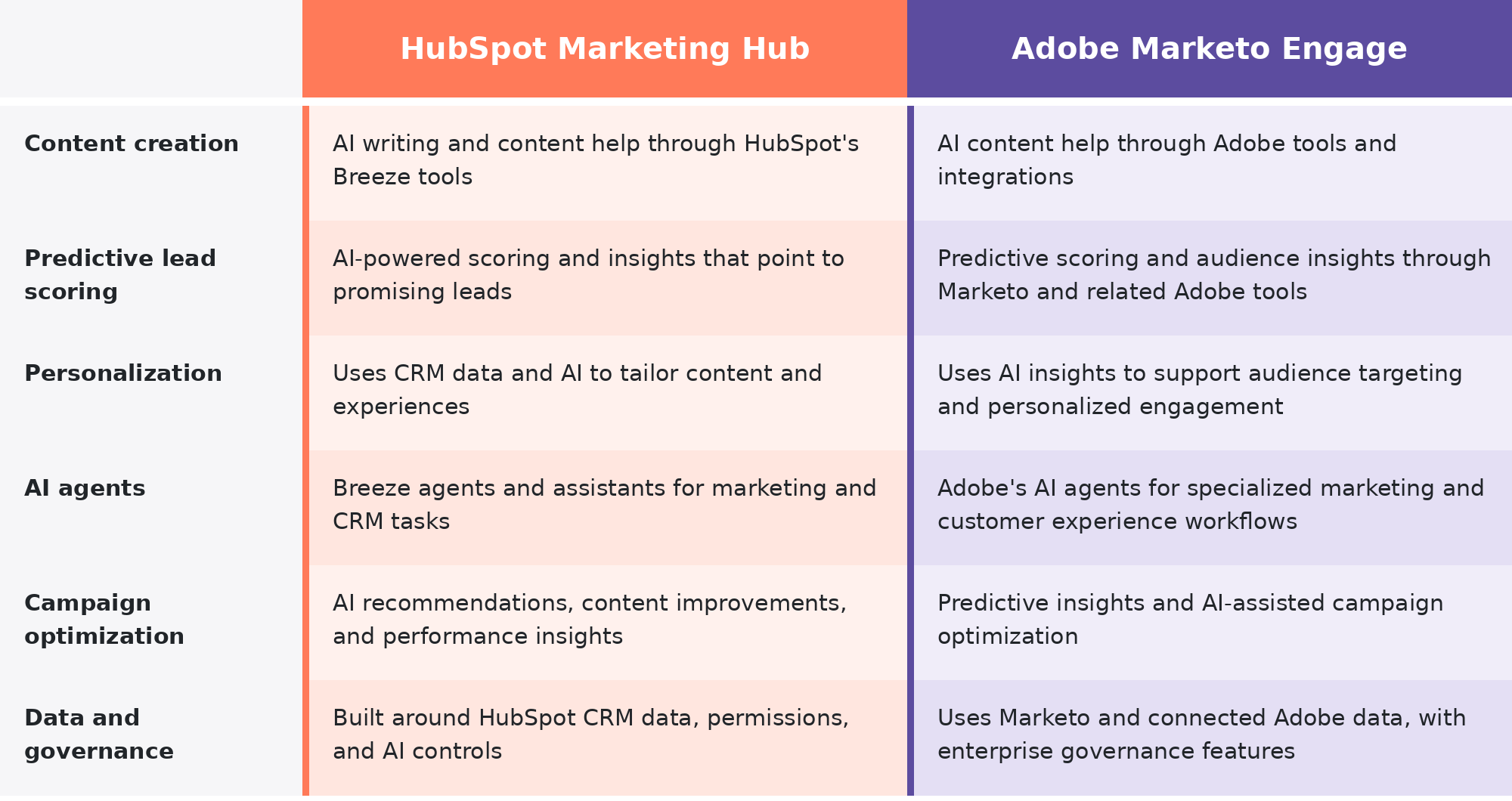
HubSpot and Marketo both use AI to help marketers create content and spot promising leads, then personalize campaigns and improve results from there. The biggest difference is how that AI fits into the tools your team already uses. HubSpot builds it into everyday marketing and CRM work, while Marketo pairs it with Adobe's broader customer experience tools.
AI Content Creation and Marketing Tasks
HubSpot's Breeze AI tools help you draft and refine content, generate marketing assets, and cut down on manual work. They're built into the customer platform, so you can use AI right alongside the tools you already use for campaigns and customer relationships.
Marketo's AI is more closely tied to Adobe's wider ecosystem. Adobe has generative AI tools for creating and producing content, but not all of them come with Marketo Engage, so you may need additional Adobe products to use them.
Predictive Scoring and Personalization
59% of B2B organizations identify more personalized customer experiences as their top AI investment goal for the next 18 months. Both HubSpot and Marketo support that goal with AI capabilities that help marketers identify promising leads, understand customer behavior, and deliver more relevant experiences.
HubSpot offers AI-powered lead scoring and insights that can help your team identify and prioritize promising leads. Its AI can also support personalization using customer information that's already stored in HubSpot.
Marketo offers predictive audience and engagement tools for complex B2B programs, though what you get depends on your package and connected Adobe products. Adobe's wider ecosystem can extend those tools with more customer insights and personalization options.
In practice, it comes down to your data setup. HubSpot's AI can work with information already connected through its CRM, while Marketo's broader AI features may depend on how your company has configured its Adobe products and integrations.
AI Agents and Campaign Optimization
HubSpot's Breeze agents and assistants can help with prospect research and CRM work, and they can create content too. You can also build custom agents and add AI-powered actions to workflows, depending on your subscription.
Adobe offers AI agents and optimization tools for more specialized B2B marketing needs. Adobe Marketo Optimizer, for example, is designed to use Marketo Engage data to recommend next-best actions and personalize engagement across accounts and buying groups. It's an additional Adobe offering rather than a standard feature of every Marketo subscription.
AI Data, Governance, and Usage Limits
Only 41% of B2B organizations say they have a unified customer data foundation that can support AI at scale. That's a problem when you're trying to get more out of AI, since its effectiveness depends heavily on the quality and accessibility of your data. Both HubSpot and Marketo need accurate customer information, clear permissions, and proper data management to make AI useful.
HubSpot gives you controls for managing AI access and usage. Some AI features require specific subscriptions or use HubSpot Credits, so check what's included before you roll out agents or high-volume AI tasks.
Marketo's AI depends on which features and Adobe products your company licenses. Check what's included, what extra data connections you'll need, and how permissions and governance work across your Adobe setup.
How Do HubSpot and Marketo Integrate With Your CRM?
Your marketing automation platform has to work with your CRM so marketing and sales can see what leads are doing and tie that activity back to revenue.
HubSpot and Marketo both support that connection, but in different ways. HubSpot has its own CRM built in, while Marketo connects to an outside CRM like Salesforce or Microsoft Dynamics.
HubSpot's Native CRM Integration
HubSpot Marketing Hub runs on HubSpot Smart CRM, so marketing and sales can work from the same contact and company records without having to sync data between separate marketing and CRM platforms.
That shared data makes it easier to follow someone through the customer journey. Marketing can see which emails a prospect opens or which forms they submit, and sales can see that activity next to their own calls and meetings.
Here's what CRM-connected workflows let you do:
- Route leads to sales reps based on qualification criteria.
- Update lifecycle stages as prospects move through the buying process.
- Notify sales when a lead takes an important action.
- Trigger follow-ups based on contact or deal activity.
- Track handoffs so leads don't get lost between marketing and sales.
Want to get more out of HubSpot's CRM? Check out our HubSpot Academy video series on lifecycle stages to learn how to define, automate, and measure them 👇
.png?width=1422&height=797&name=shadab%20academy%20main%20(1).png)
Because the data lives in one place, your team spends less time managing integrations and more time acting on what they know about their customers.
Marketo's CRM Integrations
Marketo doesn't have a built-in CRM, but it has native integrations with Salesforce and Microsoft Dynamics. Those connections let marketing and sales share lead information and keep records updated across both systems.
When someone fills out a Marketo form or engages with a campaign, supported lead data and activities can be shared with the CRM, depending on how the integration is configured. Sales can use that information to understand what a prospect cares about, and marketing can use CRM data to sharpen targeting and nurturing.
The catch is that you're managing two systems, so there's more to keep an eye on.
- Data mapping means making sure fields match between Marketo and your CRM.
- Synchronization rules decide which records and properties sync.
- Data ownership settles which system controls specific information.
- Duplicate management keeps records accurate and avoids conflicting data.
- Troubleshooting means watching for sync errors and fixing records that don't update when they should.
Marketo's integrations can support sophisticated marketing and sales operations, but they need ongoing attention to data quality and syncing.
Can You Use HubSpot Marketing Hub With Salesforce?
Yes. You can use Marketing Hub with Salesforce without replacing Salesforce as your CRM.
HubSpot has a native Salesforce integration that syncs supported records between the two platforms. That means you can use HubSpot for marketing automation while your sales team keeps managing its pipeline in Salesforce.
This is worth a look if your company already uses Salesforce but wants to compare HubSpot with Marketo.
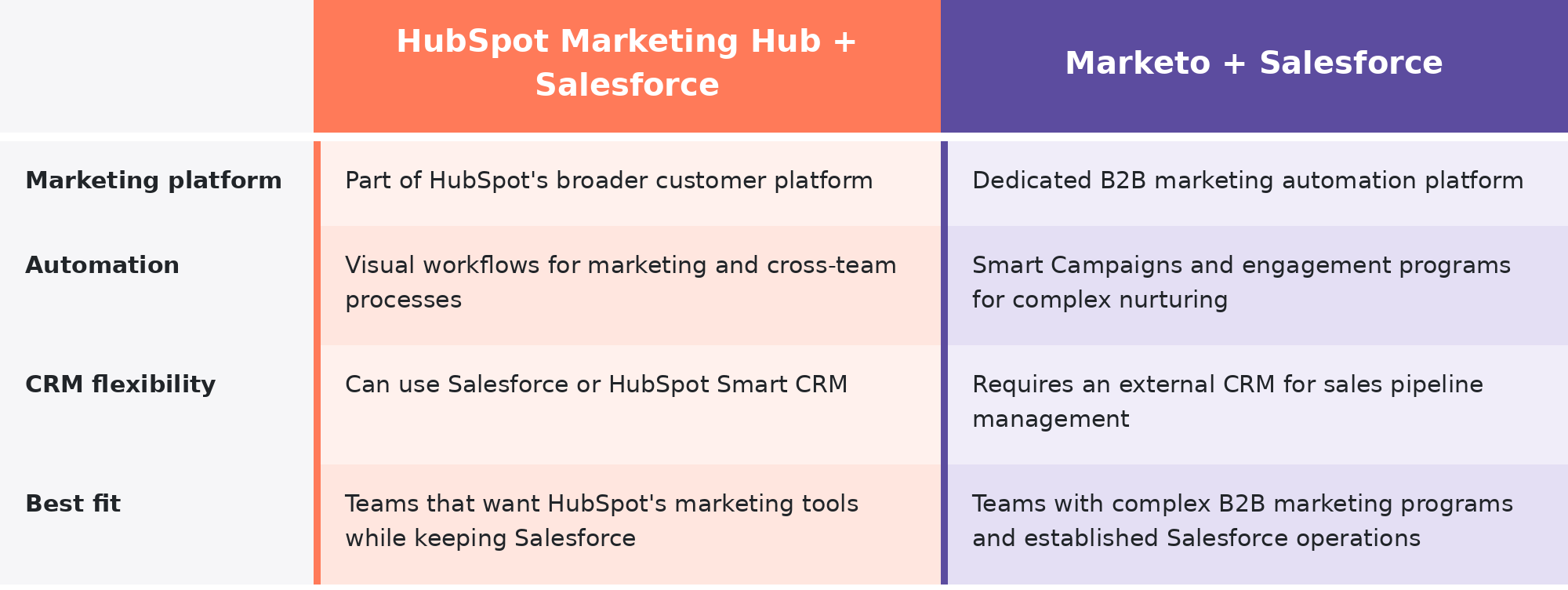
Whichever platform you pick, you'll need to decide which system owns each type of data and how records should sync. Not every field or activity transfers automatically, so the integration has to be set up around your sales and marketing processes.
Marketo vs. HubSpot: Reporting and Revenue Attribution
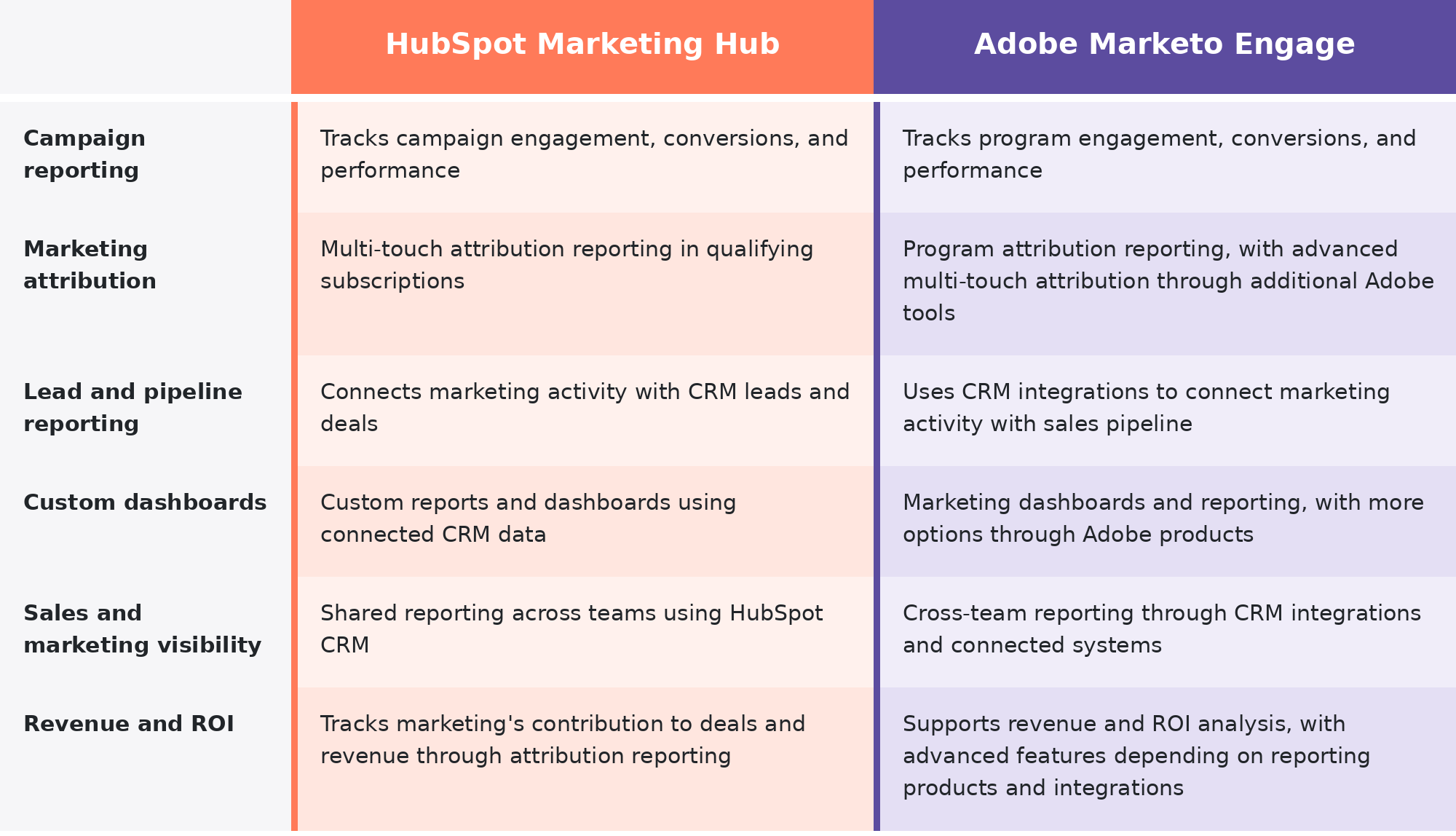
Both HubSpot and Marketo can show you how your campaigns are performing, but the bigger question is whether you can connect that activity to pipeline and revenue. Email opens and form submissions are useful, though they don't tell you how much business your marketing is bringing in.
How HubSpot Handles Reporting
HubSpot ties marketing reporting to the same CRM records your sales team uses. You can see how campaigns generate contacts and influence deals, then use attribution reports to find out which marketing activities contribute to revenue.
Custom dashboards also let you bring marketing and sales metrics together, so you're not stuck comparing numbers from separate systems. Advanced attribution and reporting features depend on your HubSpot subscription.
How Marketo Handles Reporting
Marketo reports on campaign performance and marketing program results, along with analytics that show how prospects move through your programs.
To connect that activity to sales pipeline and revenue, Marketo relies on CRM data and its own reporting tools. More advanced attribution and revenue analytics may require additional Adobe products, such as Adobe Marketo Measure, plus the right integrations and setup.
Which Platform Gives You Better Revenue Visibility?
Both platforms can help you measure marketing's impact on revenue, but how easily you get there depends on your setup.
HubSpot has an advantage when marketing and sales share the same CRM, since campaign activity and deal information are already connected. Marketo can deliver detailed revenue insights too, but pulling marketing and sales data together may take more configuration and additional reporting tools.
Case Study: Applied Ceramics 
See how RevPartners helped Applied Ceramics connect lead qualification, campaign tracking, and revenue reporting in HubSpot to give marketing and sales a clearer picture of performance.
Check out the full case study HERE!
Which Is Easier to Use and Implement: HubSpot or Marketo?
HubSpot is generally easier to learn and manage, while Marketo takes more technical experience to get up and running. Both can handle complex marketing operations, but how much work they take depends on your existing systems and how much customization you need.
Ease of Use
Marketers used just 49% of their martech capabilities in 2025, showing how much functionality can go untapped. That's why ease of use matters when choosing a marketing platform.
HubSpot is built to be user-friendly, even if your team doesn't have a dedicated marketing ops person. The interface is easy to get around, and drag-and-drop editors and visual workflows let marketers build campaigns without writing code.
Marketo has a steeper learning curve. It gives experienced users detailed control over campaigns and automation, but getting comfortable with Smart Campaigns, engagement programs, and the rules behind them takes time. Even routine changes can call for a solid understanding of how everything fits together.
For everyday marketing tasks, HubSpot is usually the easier choice. Marketo makes more sense for teams that already have the technical experience to manage a more complex setup.
Implementation and Onboarding
Getting either platform running takes more than creating an account. You'll need to prepare your data, set up your marketing processes, and make sure everything works with your existing systems.
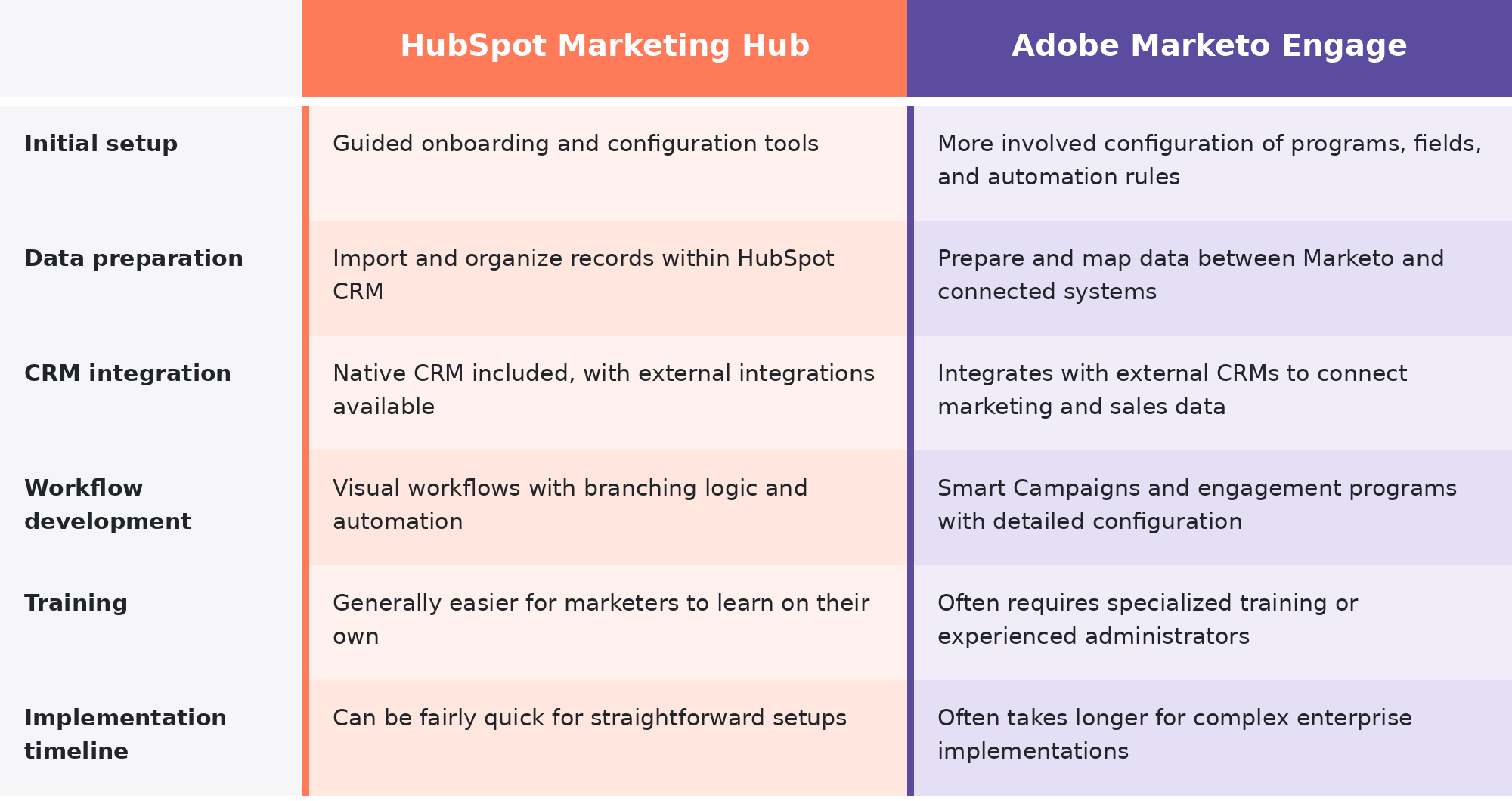
HubSpot's built-in CRM can simplify implementation if you're moving marketing and sales onto the same platform. If you're migrating a large database or connecting several existing systems, though, there's still plenty of planning and testing to do.
Marketo implementations usually take more upfront configuration, especially when you're connecting an established CRM or rebuilding complex nurturing programs. For either platform, the timeline depends on your data quality, your integrations, and how much automation you're putting in place.
Ongoing Maintenance
Once everything is live, someone still has to keep your automation running. That means updating workflows, checking data quality, and making sure integrations keep working.
HubSpot's visual tools and shared CRM keep much of that manageable. Marketing teams can often update campaigns, troubleshoot workflows, and maintain contact data without needing a specialist for every change, though more advanced setups and integrations may still need technical support.
Marketo usually needs more hands-on administration. Managing Smart Campaigns, engagement programs, CRM syncing, and database hygiene takes someone who understands how the pieces work together, so larger organizations often rely on dedicated marketing ops specialists or experienced Marketo admins.
HubSpot vs. Marketo Pricing: How Much Do They Cost?
HubSpot publishes its pricing, so you can see what each plan costs before talking to sales. Marketo uses custom quotes, which makes it harder to compare prices without knowing exactly what your business needs.
But subscription fees are only part of the equation as you'll also need to factor in contact limits and the cost of getting each platform set up and staffed.
HubSpot Marketing Hub Pricing
HubSpot Marketing Hub has free tools plus three paid tiers, starting with Starter and moving up through Professional and Enterprise. What you pay depends on your plan and billing terms, plus how many seats and marketing contacts you have.
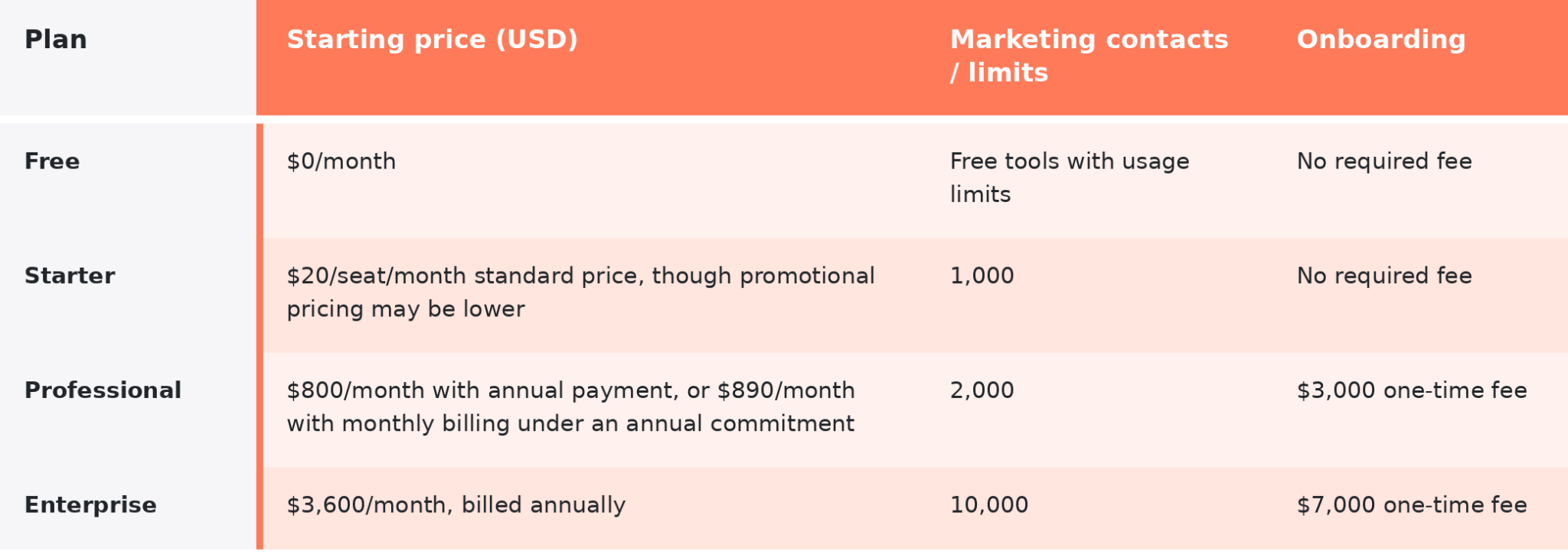
These are HubSpot's published starting prices, so your final subscription may cost more. Professional includes three Core Seats and Enterprise includes five. The $800 Professional rate requires annual payment, while the $890 monthly rate is typically billed under an annual commitment.
Starter covers the basics, Professional adds more advanced automation and reporting, and Enterprise is built for larger teams that need more flexibility and control. Some features are limited by tier, and usage limits vary.
Contact limits matter too. HubSpot charges based on the contacts you're actively marketing to, so your bill can climb as that list grows. Email send limits are tied to your contact tier, and some AI features use HubSpot Credits.
Before you pick a plan, check which features are included and how many contacts you'll be marketing to, since extra seats and usage charges can add up.
Adobe Marketo Engage Pricing
Adobe Marketo Engage doesn't publish standard prices. Adobe gives custom quotes based on the package you pick and the size of your lead and account database.
Marketo comes in four packages:
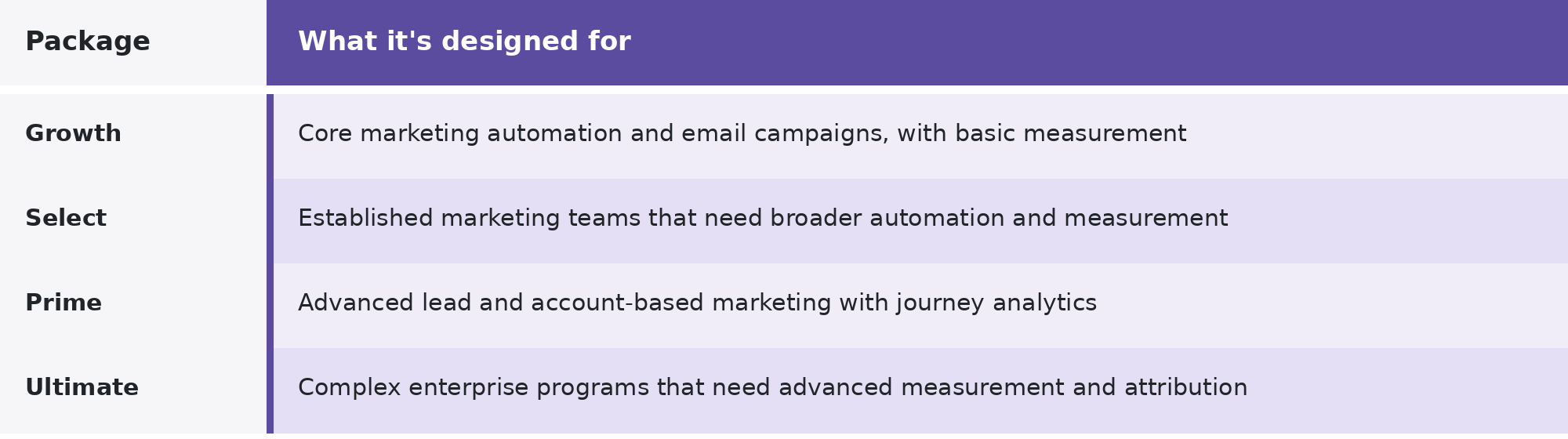
All four packages include core marketing automation, but advanced features and usage allowances vary. Some capabilities only come with higher packages or as add-ons.
Because pricing is custom, it's worth asking Adobe a few questions before you commit.
- Database size matters, so ask how pricing changes as your lead and account database grows.
- Included features are worth pinning down, including which automation, AI, and reporting tools come with your quote.
- Usage limits should be clear, such as how many users and API calls are included.
- Additional products may be needed, so ask whether you'll have to buy separate Adobe tools for advanced attribution.
- Onboarding and support can vary, so find out what's in the quote and which services cost extra.
- Contract terms affect your long-term cost, so ask what happens to pricing when you renew, expand, or upgrade.
Getting those answers upfront makes it much easier to compare Marketo's quote with HubSpot's published pricing.
Total Cost of Ownership
The cheapest subscription isn't always the cheapest platform to run. Total cost of ownership covers everything you spend to get the software working and keep it that way.
Here's what to account for with either platform:
- Software licensing covers your subscription plus any seats or usage charges beyond it.
- Implementation and onboarding covers data migration and initial setup, plus any onboarding services you have to pay for.
- CRM integrations take work to connect, map fields, and keep data syncing.
- Administration and staffing means the people who run your campaigns and manage platform settings.
- Training and support covers getting your team comfortable with the software and handling issues after launch.
- Additional tools means any extra products you need for reporting, content, or AI.
HubSpot's published pricing makes the starting budget easier to plan, and its built-in CRM can cut down on separate tools. Higher tiers and a growing contact list can still push the total up.
Marketo's cost depends more on the package and setup you need. Teams with experienced marketing ops people may already have the skills to run it, while others may need to bring in specialist help.
Considering a move from Marketo to HubSpot?
Get a free migration scoping session with RevPartners to understand what's involved before making the switch.
Marketo vs. HubSpot: Which Is Better for Enterprise Teams?
Both HubSpot and Adobe Marketo Engage can support enterprise marketing teams, but they're built around different priorities. HubSpot focuses on making complex operations easier to manage, while Marketo gives you more flexibility if your marketing requirements are highly specialized.
For larger businesses, the decision usually comes down to how much complexity you need the platform to handle and how much of it your team wants to manage.
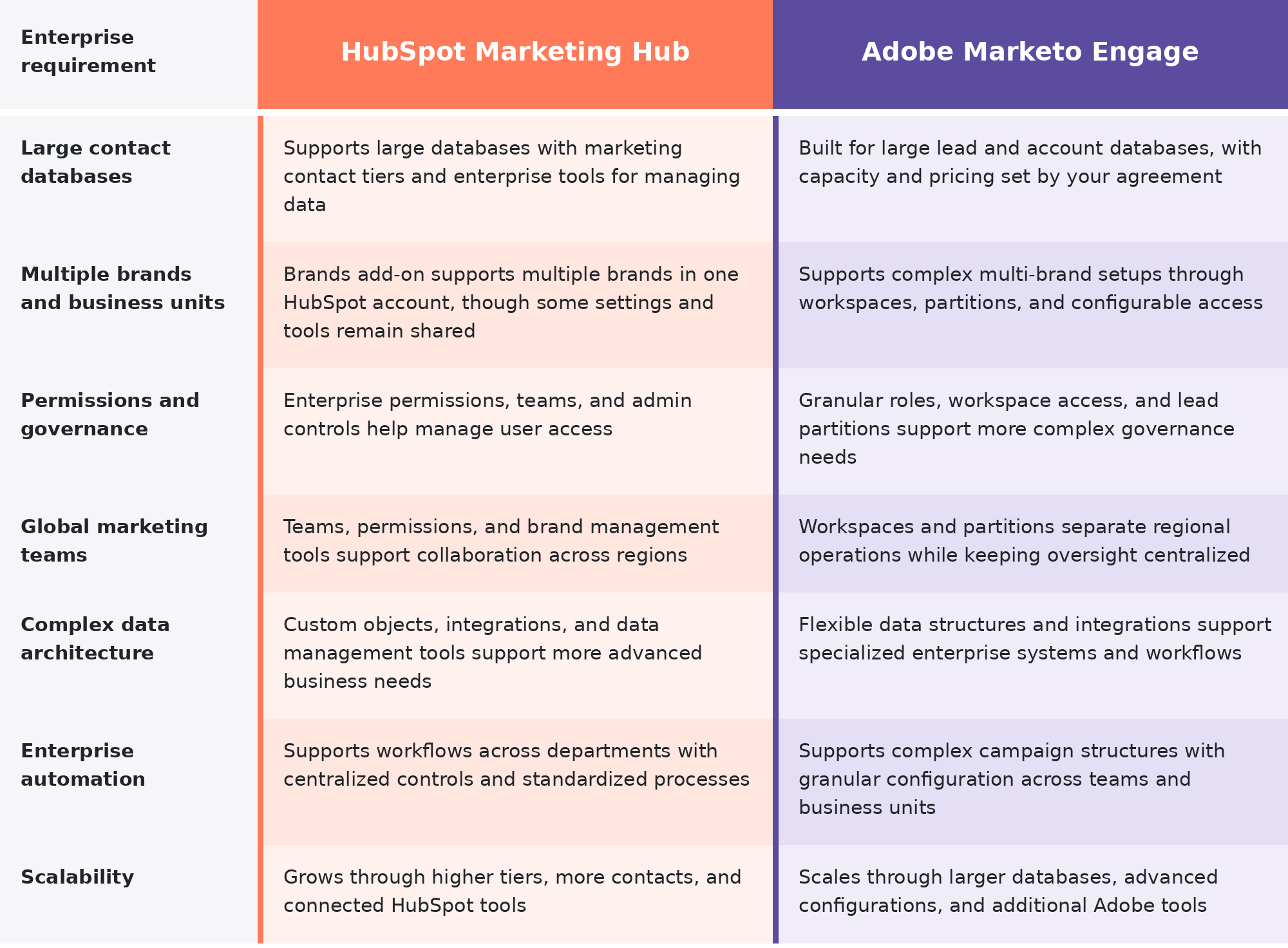
Where HubSpot Makes More Sense for Enterprise Teams
HubSpot is a strong fit for enterprises that want to support multiple teams without making the platform harder to use than it needs to be.
Its Enterprise tools give you more control over permissions, data, and business processes while keeping administration fairly straightforward. That's especially useful when marketing ops supports several departments or regions.
HubSpot may be the better choice if your business wants to do any of the following:
- Give different teams access to the tools and data they need without overcomplicating administration.
- Manage multiple brands while keeping shared processes and visibility where it makes sense.
- Expand marketing operations without leaning as heavily on specialized platform administrators.
- Add new teams and integrations as the business grows.
There are limits to keep in mind, especially around how independently your brands or business units need to operate. HubSpot's Brands features don't necessarily offer the same level of separation as Marketo's workspaces and partitions.
Where Marketo Makes More Sense for Enterprise Teams
Marketo is worth a look when your organization needs more separation and control across complex marketing operations.
Its workspaces and lead partitions can help you manage different regions, brands, or business units with their own access requirements. That makes it useful for enterprises where teams need to operate independently inside a larger marketing system.
Marketo may be the better fit if your business needs to do any of the following:
- Separate lead databases and marketing assets across business units.
- Manage highly specialized permissions and governance requirements.
- Support regional teams with their own processes and operational needs.
- Build complex marketing programs that take extensive configuration.
The tradeoff is that all that flexibility can make the platform more demanding to administer. Enterprises with dedicated marketing ops specialists are better positioned to handle it.
HubSpot vs. Marketo: Which Should You Choose?
Both HubSpot and Marketo are capable B2B marketing platforms, but the better choice depends on how your business runs and what you need from your marketing tech.
Choose HubSpot If...
HubSpot is a strong fit if you want powerful marketing tools without making your tech harder to manage.
Choose HubSpot if your business wants to do any of the following:
- Connect marketing and sales through shared CRM data and tools that work together.
- Make adoption easier with a platform that's generally more approachable for everyday users and administrators.
- Consolidate your GTM tech instead of juggling several disconnected platforms.
- Improve revenue visibility by giving teams consistent customer data across the buyer journey.
- Scale without extra complexity as you add contacts, campaigns, and teams.
HubSpot is especially appealing if you want your marketing tech to support the whole customer journey and not just campaign execution.
Thinking about switching from Marketo to HubSpot? Check out our five-part migration video series to learn how to plan, rebuild, test, and launch without disrupting your marketing operations 👇
Choose Marketo If...
Marketo may be a better fit if your business has highly specialized marketing requirements and the resources to manage them.
Choose Marketo if your business needs to do any of the following:
- Run sophisticated enterprise automation with complex campaign logic and advanced configuration.
- Build highly customized nurturing programs for different audiences and buying journeys.
- Get more out of your Adobe investment by working inside an established Adobe ecosystem.
- Support a dedicated marketing ops team that can handle complex configuration and ongoing administration.
- Handle specialized campaign requirements that call for more granular control over your programs.
Marketo makes sense for enterprises that need extensive customization and already have the technical resources to support it.
Both platforms can handle complex B2B marketing. But if you want marketing, sales, and customer data working together without unnecessary complexity, HubSpot's connected approach gives you an advantage.
Frequently Asked Questions About HubSpot vs. Marketo
What is the main difference between HubSpot and Marketo?
HubSpot is a customer platform that connects marketing, sales, service, and CRM data, while Adobe Marketo Engage focuses on advanced B2B marketing automation. HubSpot offers a built-in CRM and tools for managing the broader customer journey. Marketo specializes in complex marketing programs and typically relies on external systems for CRM and sales management.
Is HubSpot or Marketo better for marketing automation?
Both platforms offer advanced marketing automation, but they approach it differently. HubSpot uses visual workflows that connect marketing activities with CRM data, sales processes, and customer service. Marketo uses Smart Campaigns and engagement programs that provide detailed control over complex lead nurturing and campaign requirements. The better choice depends on your automation needs and available technical resources.
Is HubSpot cheaper than Marketo?
HubSpot publishes starting prices for its Marketing Hub plans, while Adobe Marketo Engage requires a custom quote based on your package and database size. However, the total cost of either platform also depends on implementation, integrations, administration, training, and additional tools. HubSpot may reduce the need for separate systems, while Marketo may require more specialized resources to manage.
Can you use HubSpot or Marketo with Salesforce?
Yes. Both HubSpot Marketing Hub and Adobe Marketo Engage offer native Salesforce integrations. HubSpot can handle marketing automation while Salesforce remains your sales CRM, and Marketo can sync supported marketing and lead data with Salesforce. Both require proper configuration, data mapping, and ongoing management to keep information consistent across systems.
Which is better for enterprise B2B marketing, HubSpot or Marketo?
HubSpot is generally a better fit for enterprises that want connected marketing and sales tools, easier administration, and shared customer data. Marketo may be better suited to organizations with highly specialized marketing programs, complex automation requirements, and dedicated marketing operations teams. The right choice depends on your existing technology, organizational complexity, and internal resources.