.png)
HubSpot Service Hub onboarding is the process of configuring ticketing, automation, AI, reporting, and customer success workflows so your support team can scale efficiently. A structured onboarding ensures Service Hub improves customer experiences, accelerates resolution times, and drives long-term retention instead of becoming another underused CRM tool.
Entrepreneur Jim Rohn once said, “If you make a sale, you can make a living. If you make an investment of time and good service, you can make a fortune.”
So let’s talk about Service Hub, the side of HubSpot that’s all about keeping your customers happy after they’ve signed the deal.
HubSpot Service Hub helps you support, retain, and grow your customer base by centralizing all your service data and customer touchpoints.
But just buying it isn’t enough.
Want to get real value? You need onboarding.

Key Takeaways
-
Service Hub connects support, success, and operations in one CRM-powered workspace
-
Onboarding matters if you want clean ticketing, smart automation, and accurate reporting
-
Breeze AI powers faster replies, smarter agents, and better team collaboration
-
RevPartners sets up Service Hub the right way with playbooks, SLAs, and knowledge base
-
Fast Track or Guided Onboarding options let you choose between done-for-you or coached setup
What is HubSpot Service Hub?
In simple terms, HubSpot Service Hub connects your support, success, and operations teams with your CRM to provide fast, seamless customer service. Think live chat, ticketing, knowledge base, CSAT surveys, automation, reporting, and yes, AI.
It’s ideal for companies who want:
-
A clean ticketing system that routes issues automatically
-
A knowledge base so customers can self-serve
-
Reporting dashboards that actually show what’s working (and what’s not)
-
And tight alignment between support, sales, and marketing
But to make it all actually work, you need to configure it properly.
How does HubSpot Service Hub onboarding work?
Looking to migrate to HubSpot? Check out our video series 👇

Onboarding isn’t just a checklist.
It's a structured, layered process that turns Service Hub into your customer support engine.
Layer 1: Customer Interaction
How do customers engage with Service Hub?
-
Live Chat & Chatbots – Customers reach out instantly via your site. (HubSpot’s own support team boosted productivity by 1.6x after fully adopting live chat in Service Hub.)
-
Forms & Ticket Submissions – Automatically generate support tickets.
-
Email & Calling – Log every interaction in your CRM.
Layer 2: Backend System & Agent Interaction
What happens after a customer submits a request?
-
Ticket Record Creation – Auto-created and ready for triage.
-
Agent Assignment – Routing rules assign tickets to the right reps.
-
Internal Collaboration – Comments, notes, @mentions, and tags.
Layer 3: Productivity & Data Management
How do we keep things clean and scalable?
-
Custom Ticket Properties – Track the stuff that matters.
-
Ticket Categorization – Organize tickets by urgency or type.
-
Knowledge Base Integration – Reduce ticket volume with smart self-service.
Layer 4: AI-Powered Assistance (Breeze AI)
How does AI make support teams faster?
-
Breeze AI: Customer Agent – A virtual assistant that handles routine requests.
-
Breeze AI: Response Assistant – Drafts AI-powered replies.
-
Breeze AI: Co-Pilot – Helps reps across Service, Sales, and Marketing.
Layer 5: Reporting & Analytics
How do we know if it’s working?
-
Ticket Volume & Time to Resolution
-
CSAT, CES, and NPS Feedback
-
Agent Dashboards to see who’s crushing it (or struggling)
What features does HubSpot Service Hub include?
Here’s where things get technical, but also powerful.
User & Agent Management
-
Add users, define roles, manage permissions
-
Create teams based on skill or language
-
Set routing rules based on ticket type or customer tier
-
Define availability and working hours for agents
Customer Portal
Let customers see their open and closed tickets in a secure, branded portal. This reduces back-and-forth and saves time.
In fact, HubSpot saved $2.3 million annually in headcount costs by using Service Hub to streamline support ops.
Knowledge Base
Build search-optimized help articles, FAQs, and video walkthroughs. Empower customers to help themselves (and reduce ticket volume).
Ticket Management
-
Visual pipelines with drag-and-drop
-
Custom ticket properties and tags
-
Conditional logic to keep data clean
-
Views customized by team function
-
Ticket-based workflows to automate updates and escalations
Channels & SLAs
-
Connect forms, email, chat, Messenger, WhatsApp, and phone
-
Define SLAs by pipeline, team, or channel
-
Automate reminders and escalation if SLA thresholds are at risk
Feedback Surveys
Use prebuilt or custom surveys to gather:
-
Customer Effort Score (CES)
-
Customer Satisfaction (CSAT)
-
Net Promoter Score (NPS) Surveys are integrated into workflows, so you can take action instantly.
Help Desk Workspace
A single dashboard for your reps to manage all conversations and tickets. No more tab overload.
Customer Success Workspace
Designed for retention and proactive engagement. Track health scores, identify churn risks, and coordinate across teams
What's the difference between HubSpot onboarding and RevPartners onboarding?
If you onboard directly through HubSpot, you get a consultant who gives you advice, but your team does most of the work. If you're short on time, bandwidth, or HubSpot know-how, that can be rough.
And if you’re an enterprise org, that can mean real dollars and time on the line as the average onboarding process for a new corporate client can take up to 100 days. That’s why 74% of enterprise orgs now have a dedicated onboarding team, and 82% say their onboarding strategy is a key driver of value.
If you onboard with a HubSpot onboarding agency like RevPartners? You get strategy and execution.
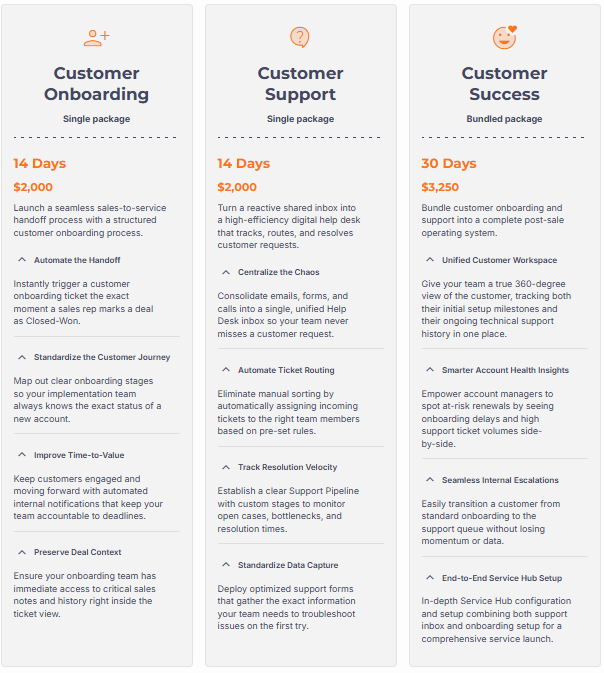
Our Service Hub implementations standardize customer onboarding, support operations, or both by creating structured processes, automating routine tasks, and giving teams clear visibility into customer health and service performance. Throughout the engagement, we configure your system and train your team so they can continue improving it long after implementation is complete.
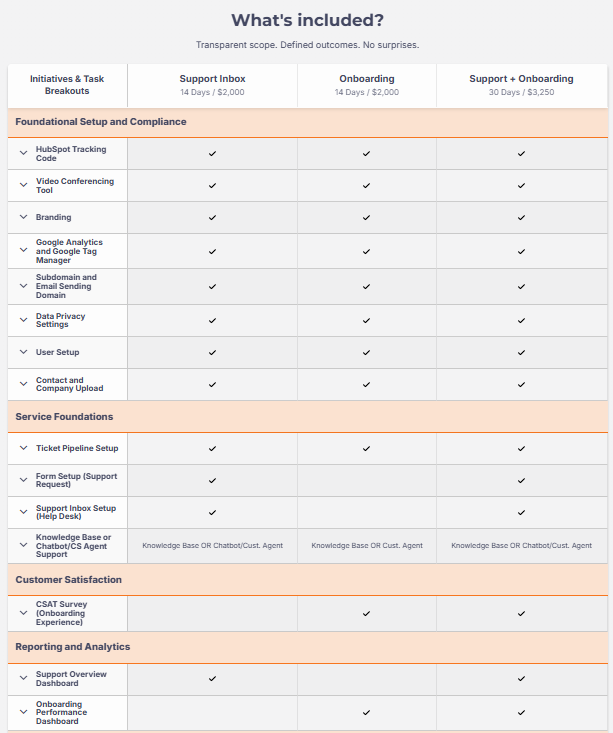
Depending on your customer success strategy, your Service Hub implementation can include:
- Ticket pipelines with custom stages and required fields
- Support request forms, Help Desk, and Support Inbox
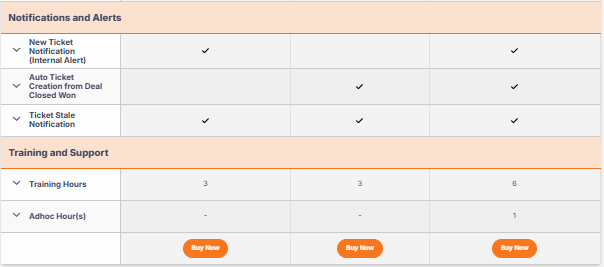
- Automated ticket routing and internal notifications
- Automatic onboarding ticket creation from Closed Won deals
- Knowledge Base, chatbot, or foundational Customer Agent setup
- CSAT surveys
- Support Overview and Onboarding Performance dashboards
- Ticket stale notifications and onboarding automation
Whether your focus is customer onboarding, technical support, or a complete customer success operation, Service Hub provides the structure, automation, and reporting needed to create a better experience after every sale.
Why Work With RevPartners?
We’re not just any HubSpot onboarding agency.
RevPartners is one of only seven partners globally to earn HubSpot’s Service Implementation Accreditation, a rigorous designation that proves our ability to serve customers with complex technical and business needs.
This is one of seven total HubSpot Accreditations we’ve earned, including CRM Implementation, Data Migration, Custom Integrations, Platform Enablement, and more.
Translation? We’re built for high-stakes onboarding that gets done right the first time.
Recap: Why HubSpot Service Hub Onboarding Matters
To get the most value from HubSpot Service Hub, organizations should focus on:
- Build a structured support operation: Configure ticket pipelines, routing rules, SLAs, Help Desk, shared inboxes, and customer portals that create consistent support experiences across every customer interaction.
- Automate repetitive service tasks: Use workflows to route tickets, trigger notifications, create onboarding tasks, escalate issues, and reduce manual work so agents can focus on solving customer problems.
- Leverage Breeze AI to improve productivity: Use AI-powered customer agents, response assistance, and copilots to resolve common requests faster while supporting human agents with intelligent recommendations.
- Empower customers through self-service: Create a searchable knowledge base, FAQs, chatbots, and customer portals that help customers find answers quickly while reducing ticket volume.
- Measure customer success with meaningful reporting: Track ticket volume, resolution times, SLA performance, CSAT, CES, NPS, and customer health to continuously improve service quality and operational efficiency.
- Align Service Hub with your broader GTM strategy: Connect customer support, customer success, sales, and marketing inside HubSpot so every team shares customer context and contributes to retention, expansion, and long-term revenue growth.
Frequently Asked Questions About HubSpot Service Hub Onboarding
What is HubSpot Service Hub onboarding?
HubSpot Service Hub onboarding is the process of configuring your support system so it works the way your business does. That includes setting up ticket pipelines, automation, Breeze AI, reporting, knowledge bases, SLAs, customer portals, and customer success workflows to help your team resolve issues faster and deliver a better customer experience.
How long does HubSpot Service Hub onboarding take?
The timeline depends on the complexity of your support operations. A basic implementation can often be completed in a few weeks, while larger organizations with multiple teams, custom automations, integrations, and complex service processes may require a longer implementation. Working with an experienced HubSpot implementation partner can significantly accelerate time to value.
What features should be configured during Service Hub onboarding?
A complete Service Hub onboarding typically includes ticket pipelines, routing rules, Help Desk, shared inboxes, customer portals, knowledge bases, Breeze AI setup, workflows, SLAs, customer feedback surveys (CSAT, CES, and NPS), dashboards, reporting, permissions, and customer success workspaces. The goal is to create a scalable service operation rather than simply enabling features.
What's the difference between HubSpot onboarding and hiring a HubSpot implementation partner?
HubSpot onboarding primarily teaches your team how to use the platform. A HubSpot implementation partner like RevPartners combines strategy with execution by designing your service processes, building automations, configuring reporting, implementing best practices, and training your team on the finished system. Instead of advising you what to build, they build it alongside you.
Why should companies invest in HubSpot Service Hub onboarding?
Without a structured implementation, Service Hub can quickly become another underused CRM tool. Proper onboarding creates standardized support processes, automates repetitive work, improves reporting, reduces response times, increases customer satisfaction, and gives leadership clear visibility into customer health, retention, and support performance.

.png)
.png)