
Lead scoring for SaaS companies is a way to rank prospects based on two things: how well they match your ideal customer profile (ICP) and how they engage with your business. Each prospect earns points that help sales and marketing prioritize leads and determine when they're ready to become marketing qualified leads (MQLs).
A full CRM doesn't equal a full pipeline.
Some prospects check every box on your ideal customer profile but barely engage, while others click everything in sight but aren't the right buyers.

So how do you know who's worth pursuing?
In this guide, we'll show you how to build a lead scoring model in HubSpot, including how to choose scoring criteria, assign points based on fit and engagement, set MQL qualification thresholds, and refine your model over time.
Key Takeaways
- Prioritize the right leads. Score prospects based on ICP fit and buying interest so sales knows where to focus.
- Know your scoring options. Fit measures who they are, engagement measures what they do, and combined scoring considers both.
- Use data you can trust. Build your model around your ICP, buyer personas, and CRM data that's being captured.
- Not all actions deserve equal points. Weight criteria by importance, use negative scoring where appropriate, and account for older engagement.
- Don't guess your MQL threshold. Review score distributions and real contacts before deciding who qualifies.
What Is Lead Scoring for SaaS Companies?
Lead scoring for SaaS companies is a way to rank prospects by assigning points based on their characteristics and interactions with your business. It helps sales and marketing identify which contacts deserve attention and when they're qualified for follow-up.
Here's how:
- Earn points: Contacts receive points for characteristics or activities that indicate they're a good potential customer.
- Lose points: Characteristics or behaviors that suggest poor fit or lower interest can reduce their score.
- Update scores: Scores change as new information becomes available or contacts interact with your business.
- Qualify leads: Companies can set score thresholds to identify contacts ready to become MQLs.
Why Is Lead Scoring Important for SaaS Companies?
Lead scoring helps SaaS companies prioritize sales outreach, align sales and marketing, and identify which prospects are worth pursuing. Instead of treating every contact the same, teams can focus their time on leads that show the strongest combination of fit and interest.
Three ways it helps:
1. Prioritize Sales Follow-Up
Your sales team can't chase every contact in your CRM. And with sales reps already spending 60% of their time on non-selling tasks, figuring out who to prioritize shouldn't eat up even more of their day.
Lead scoring helps them:
- Focus on higher-priority prospects based on their fit and engagement.
- Spend less time sorting through leads to decide who deserves attention.
- Identify contacts worth following up with as their scores change.
2. Get Sales and Marketing on the Same Page
Marketing and sales need to agree on what makes a lead qualified. Lead scoring gives both teams a shared set of criteria to:
- Define what qualifies as an MQL.
- Create a more consistent handoff between marketing and sales.
- Give sales clearer context on why a contact was qualified.
3. Match Scoring to Your SaaS Sales Motion
Not every SaaS company sells the same way, so scoring priorities can differ:
- Enterprise-focused SaaS: May place more weight on how closely a company and its buyers match the ideal customer profile.
- Product-led growth (PLG) SaaS: May place more weight on engagement, including tracked product interactions.
What Are the Three Types of Lead Scoring?
The three types of lead scoring are fit scoring, engagement scoring, and combined scoring.
Each answers a different question about a prospect:
-Are they the right buyer?
-Are they showing interest?
-Are they both?
1. Fit Scoring
Fit scoring measures how closely a contact or company matches your ICP.
It evaluates information about the prospect, including:
- Contact attributes: Characteristics such as job title or buying role.
- Company attributes: Characteristics such as company size or industry.
A high fit score indicates that a prospect closely matches the type of customer your business wants to attract, regardless of how much they've engaged.
2. Engagement Scoring
Engagement scoring measures how prospects interact with your business.
With B2B buyers nearly 70% through their purchasing process before engaging sellers, tracking those early interactions can help you understand who's showing interest before they ever speak with sales.
It considers activities such as:
- Email interactions: Opens, clicks, and replies.
- Website activity: Visits to your website.
- Forms and meetings: Submissions and interactions with your team.
- Product interactions: Tracked activity within your SaaS product.
Engagement scores can change as prospects interact with your business, helping teams understand their level of interest.
3. Combined Lead Scoring
Combined lead scoring evaluates fit and engagement together.
A prospect might be a perfect ICP match but show little interest. Another might engage frequently without being the right buyer.
Combined scoring accounts for both.
We generally recommend combined scoring in HubSpot because it provides an overall score while keeping fit and engagement scores visible separately.
Supered Case Study 
See how we helped Supered use contact-level scoring and buying signals to prioritize accounts and focus sales outreach.
Check out the full case study HERE!
How to Build a Lead Scoring Model for SaaS
Building a SaaS lead scoring model starts with defining your ideal customers, auditing your CRM data, and deciding which characteristics and activities deserve points. From there, you'll assign weights, set scoring limits, and account for how often and how recently prospects engage.
Here's how to build your model in six steps.
Step 1. Define Your ICP and Buyer Personas
Before assigning points, get clear on who you're trying to reach.
Your ICP describes the companies that are the best fit for your business. Your buyer personas identify the people within those companies who influence or make purchasing decisions.
And with the average B2B buying group involving 11 people, identifying the right contacts within your target accounts becomes even more important.
Start by reviewing:
- Company characteristics: Industry, employee count, annual revenue, geography, and tech stack.
- Contact characteristics: Job titles, buying roles, and decision-making responsibilities.
- Existing customer data: Which characteristics appear most often among contacts who progress through your lifecycle stages?
Next, identify which characteristics indicate:
- Positive fit: Attributes that closely match your ICP and target buyers.
- Neutral fit: Attributes that don't strongly indicate a good or bad fit.
- Negative fit: Attributes associated with contacts or companies outside your target audience.
Step 2. Audit Your CRM Data
A scoring model can only evaluate information that's available in your CRM. And with 76% of surveyed CRM users and stakeholders reporting that less than half their CRM data is accurate and complete, it's important to know what you're working with.
Before choosing criteria, check whether the properties and engagement activities you want to score are being captured.
Here's what to review:
- Property fill rates: Check how many records have values for important fields such as job title, industry, employee count, and annual revenue. We recommend looking for properties with at least 50% completion.
- Property values: Look for missing information, inconsistent naming, and different values that mean the same thing.
- Lifecycle-stage trends: Compare the characteristics of leads, opportunities, and customers to see which attributes are associated with progression.
- Engagement tracking: Confirm that your CRM captures relevant email activity, website visits, forms, meetings, and marketing events.
Pay particular attention to inconsistent property values. For example, if the same job title appears in several variations, those differences can affect how consistently contacts are scored. Review and standardize the values before using them in your model.
Step 3. Select Your Fit Scoring Criteria
Now that you know who your ideal customers are and what data you have, decide which attributes should contribute to their fit scores.
Start with the characteristics that best distinguish your target buyers from contacts who aren't a good fit.
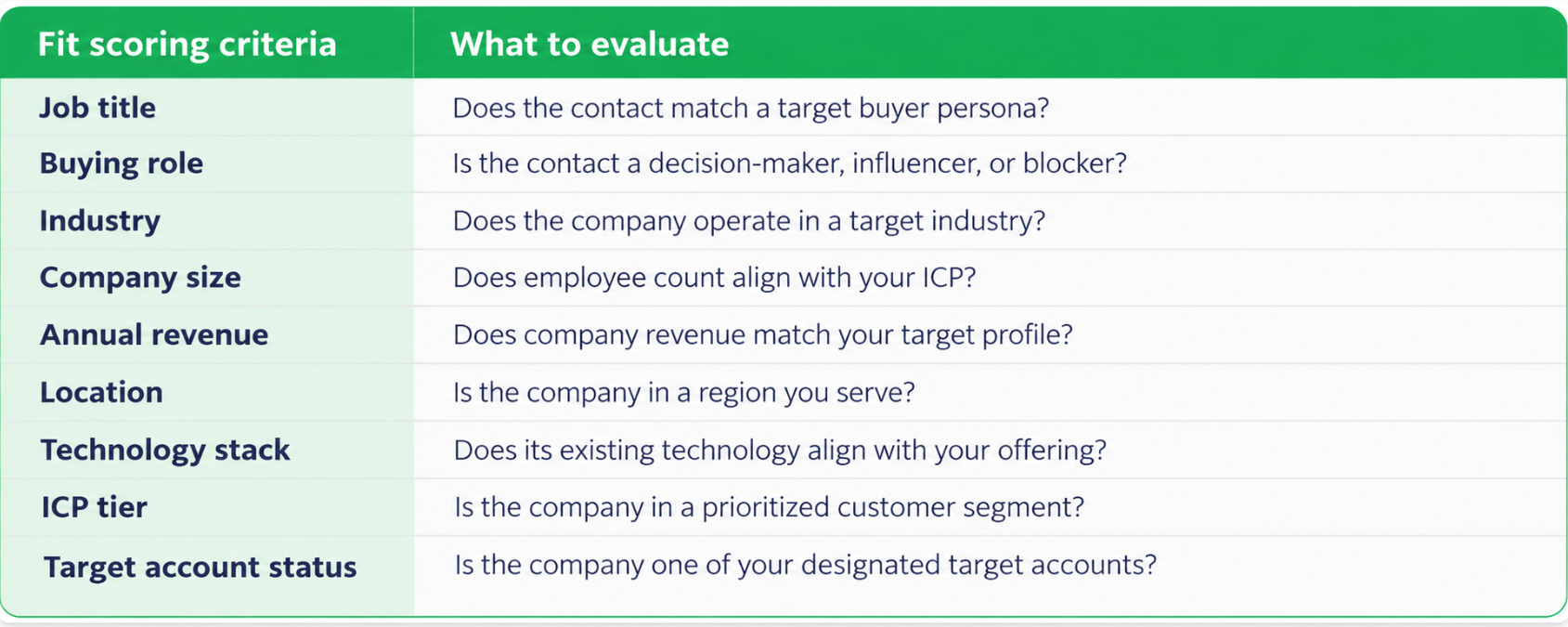
Prioritize criteria based on three things:
- ICP relevance: How strongly does the attribute indicate that someone is a good potential customer?
- Data availability: Is the property populated consistently enough to score contacts?
- Lifecycle-stage trends: Does the attribute appear more frequently among contacts who progress toward opportunities and customers?
An attribute that closely matches your ICP but is missing from most records may be less useful than one you can evaluate consistently.
Step 4. Select Your Engagement Scoring Criteria
Next, decide which interactions indicate that a prospect is interested in your business.
Not every interaction carries the same meaning. Someone opening an email may be showing interest, but replying to it is a stronger signal.

How do you decide which activities matter most?
Look at what each interaction tells you about the prospect.
- Email: A reply generally deserves more consideration than a click, and a click more than an open.
- Forms: A submission can indicate stronger interest than simply viewing a form.
- Website: Visiting a pricing page may indicate more buying interest than visiting a careers page.
- Events: Attending an event can indicate greater engagement than registering without attending.
FMG Case Study 
See how we helped FMG use webinar engagement and lead scoring to automatically route 950+ high-interest leads to sales.
Check out the full case study HERE!
For SaaS companies, tracked product interactions can also provide useful engagement signals when those events are available.
Don't overlook negative engagement signals. For example, unsubscribing from marketing emails may warrant negative points because it indicates that the contact no longer wants that type of communication.
You should also consider whether an interaction happens once or repeatedly. Frequent activity can provide additional context, although the number of points it contributes should be controlled by your scoring model.
Step 5. Assign Points, Weights, and Scoring Limits
You've identified what matters. Now decide how much each attribute or activity should contribute to the score.
We use a best-to-worst framework to organize scoring criteria.
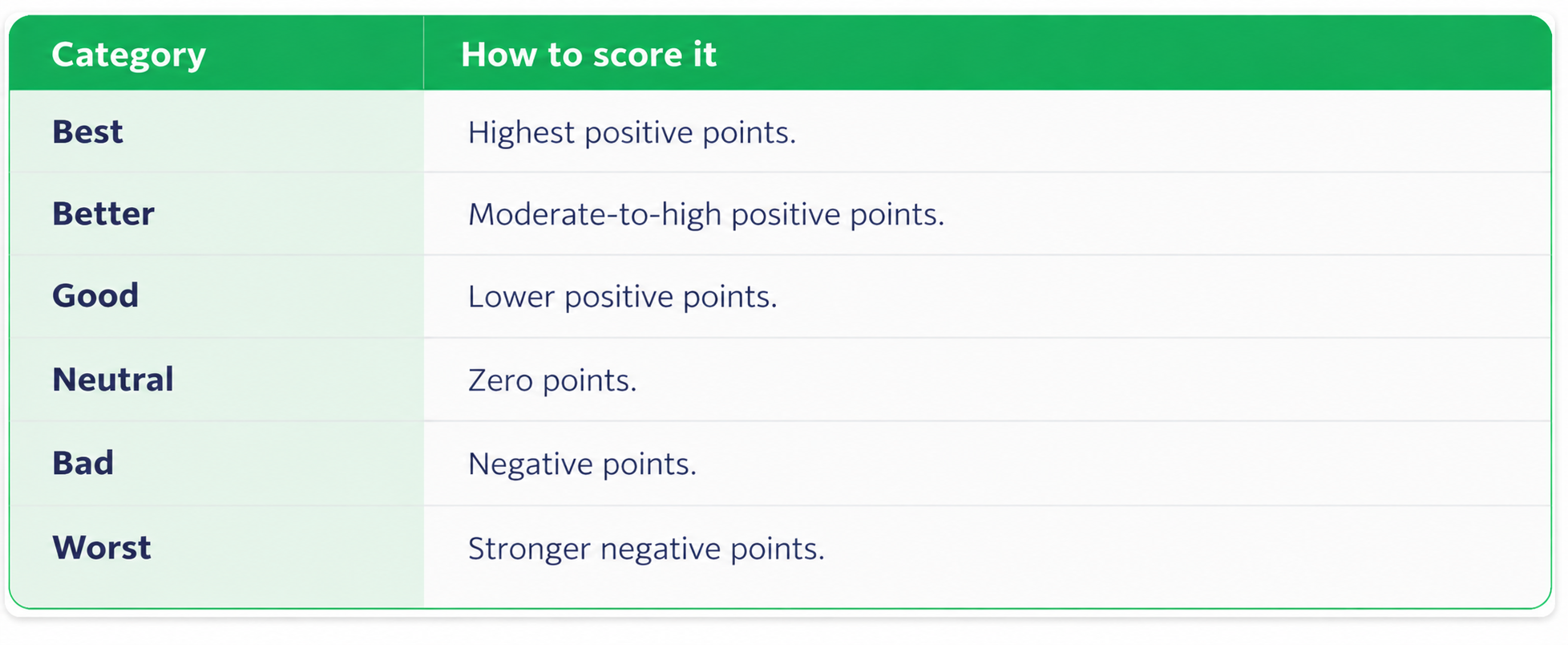
This helps you distinguish between characteristics that strongly indicate a good fit and those that suggest a contact should receive less attention.
Organize Criteria Into Scoring Groups
Scoring groups bring related attributes or activities together.
For example, you might have separate groups for job titles, company size, marketing emails, and website engagement.
Each group receives a point limit based on its importance within the overall scoring model.
Here's how the pieces fit together:
- Overall score limit: Establishes the maximum available points for the scoring model or scoring component.
- Group limit: Determines how much a category, such as job title, can contribute.
- Individual criteria: Receive point values within their scoring group.
Be Careful With Negative Scoring
Negative points can help deprioritize contacts who don't match your ICP or demonstrate behaviors associated with lower interest.
However, missing information shouldn't automatically be treated as poor fit.
Overly aggressive penalties for unknown property values can push otherwise relevant contacts into unnecessarily low or negative scoring ranges.
Want to see how all of this comes together? Watch our free 5-part Allbound Academy series to learn how to identify your best prospects, track buying signals, build scoring models, and use those scores to prioritize outreach 👇
Step 6. Account for Engagement Frequency and Recency
A prospect's engagement score shouldn't depend only on whether an interaction happened.
You should also consider how often it happens and how recently it occurred.
1. Account for Frequency
Some interactions can contribute points each time they occur.

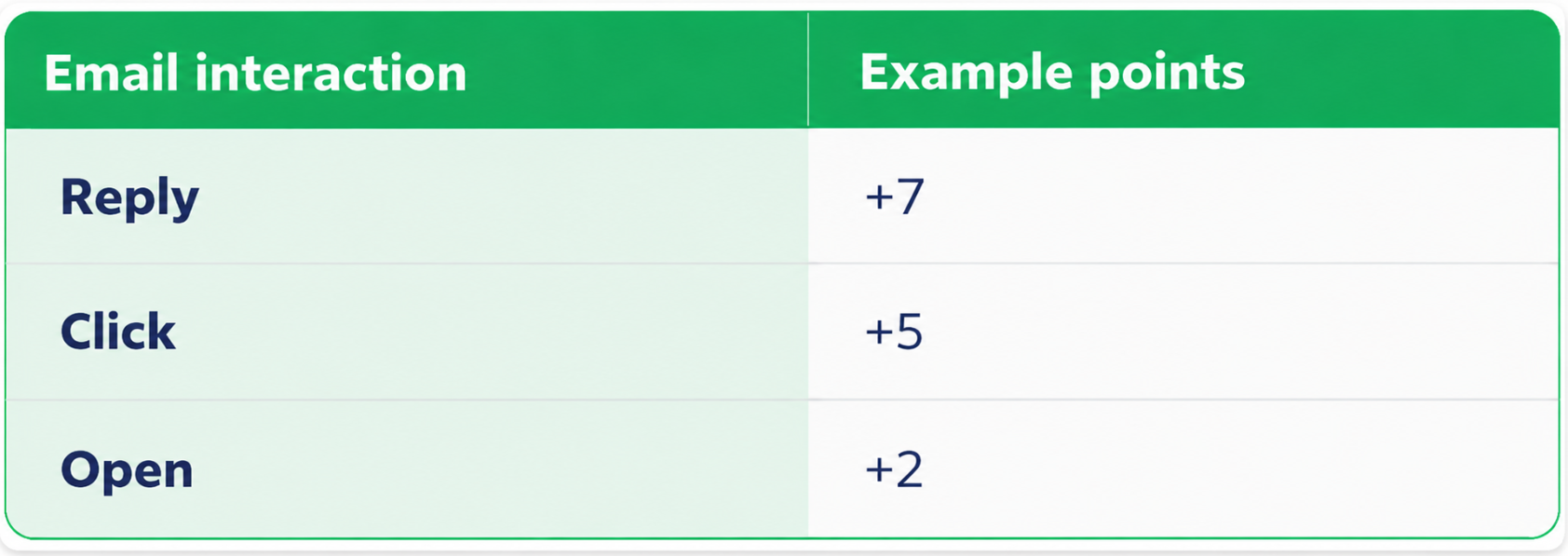
This example gives more weight to email replies than clicks or opens.
Scoring group limits help control how much repeated activity contributes to the overall score.
2. Set Engagement Timeframes
You can limit scoring to interactions that occurred within a specified period.
This helps keep the model focused on relevant activity rather than counting every interaction indefinitely.
3. Apply Score Decay
Score decay reduces the contribution of older engagement activities over time.
For example, a marketing email scoring group could use 50% decay over three months, reducing the value of older interactions as time passes.
4. Match Decay to Your Sales Cycle
The appropriate decay period depends on how long your sales cycle typically lasts.
That way, engagement from several months ago doesn't carry the same weight as more recent activity.
How to Set Up Lead Scoring in HubSpot
To set up lead scoring in HubSpot, choose a scoring model, configure your rules, create analysis views and dashboards, and make scores visible to sales.
Once you've established your scoring criteria, point values, and group limits, follow these four steps to put your model to work.
Step 1. Choose Your Lead Scoring Type
HubSpot offers three scoring options:
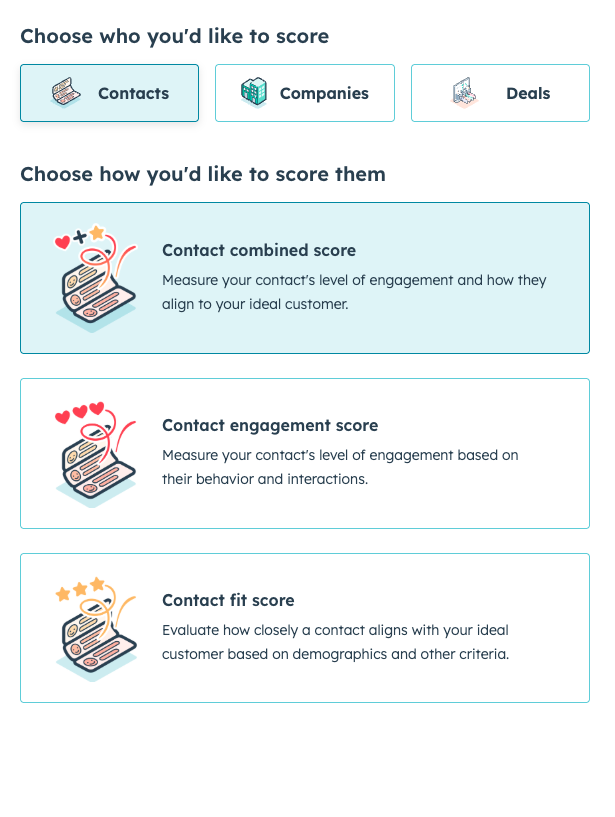
- Fit scoring: Evaluates contacts based on their properties.
- Engagement scoring: Evaluates contacts based on tracked interactions.
- Combined scoring: Creates three scores: fit, engagement, and an overall combined score.
We generally recommend combined scoring because teams can see both individual scores alongside the combined total.
If you build separate fit and engagement scores, you can use a calculated property to combine them when needed.
Step 2. Configure Your Scoring Groups and Rules
Use the scoring framework you've already developed to configure your model in HubSpot.
- Create scoring groups that match the categories established during model design.
- Add fit criteria using the relevant contact or company properties.
- Add engagement criteria using tracked events and interactions.
- Apply point values and group limits to control how much each category contributes.
- Set timeframes and decay for engagement activities where applicable.
Give your scoring properties clear names so sales and marketing can easily distinguish between fit, engagement, and combined scores.
Step 3. Create Lead Scoring Views and Dashboards
Next, make scores easier to review across your CRM.
Create two contact views:
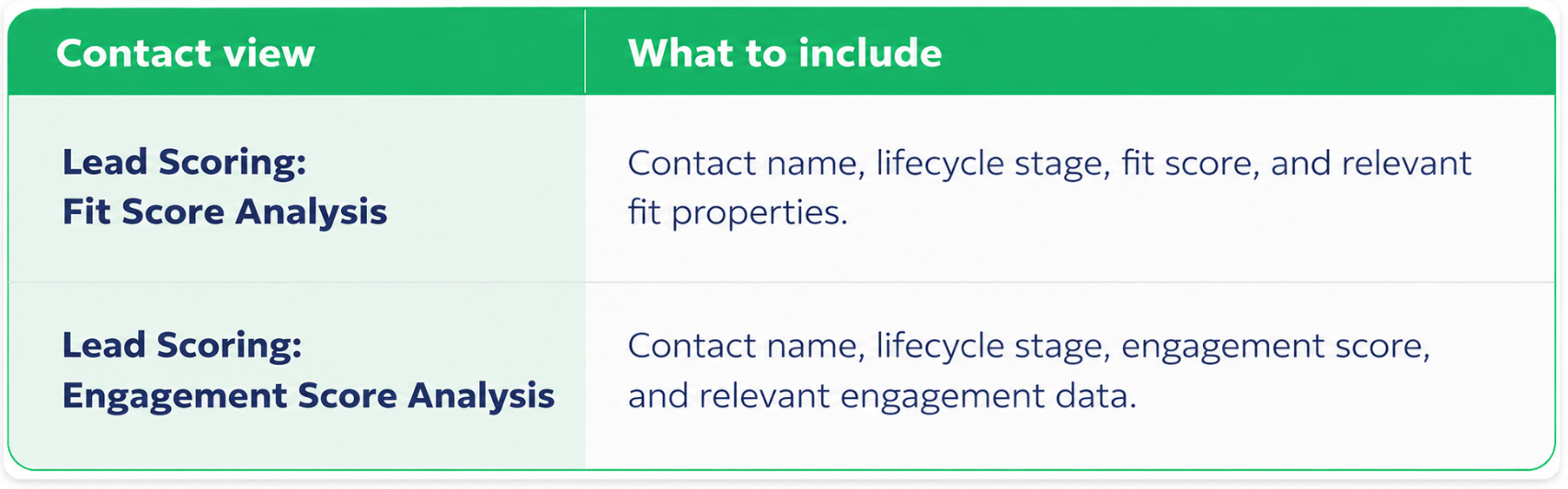
These views help teams compare contacts and examine how scores differ across lifecycle stages.
Then, build a lead scoring dashboard with reports that break down fit and engagement scores by scoring group and lifecycle stage.
Step 4. Make Lead Scores Visible to Sales
Finally, make scoring information accessible wherever sales reviews leads.
- Add scoring properties to contact views so reps can compare contacts.
- Add the lead score card to contact records so reps can inspect individual scores and contributing information.
- Check property access so the right team members can see the scores.
How Do You Determine the Right MQL Score Threshold?
The right MQL score threshold depends on how your contacts are scored, how many qualify, and whether sales can realistically follow up with them.
There's no universal MQL score for SaaS companies. The goal is to identify promising prospects without overwhelming your sales team.
Here's how to determine your initial threshold in four steps.
Step 1. Analyze Your Lead Score Distribution
Start with HubSpot's Preview Distribution feature to see how contacts are distributed across scoring ranges.
Review:
- Eligible contacts: How many contacts are included in the analysis?
- Sample size: How many contacts does the preview evaluate?
- Score distribution: How many contacts fall into each scoring range?
- Highest-scoring groups: How many contacts could qualify at different score thresholds?
Important: Preview Distribution is sample-based. It helps estimate how contacts might qualify, but the results don't represent a complete evaluation of every contact in your CRM.
For this initial analysis, we recommend setting the scoring scope to all contacts to avoid unnecessarily restricting the population being evaluated.
Step 2. Select a Practical Starting Threshold
Use the distribution to identify a score that produces a manageable number of MQLs.
- Start with the highest-scoring group. See how many contacts qualify.
- Check the volume. Is the group large enough to provide meaningful opportunities for follow-up?
- Evaluate the next tier if needed. If too few contacts qualify, consider a lower threshold.
- Choose your starting score. Balance lead quality with the number of contacts sales can reasonably handle.
The highest-scoring group isn't automatically the right MQL cutoff. Your threshold should reflect both the quality of the contacts and the volume your sales team can manage.
Step 3. Validate Contacts Near the Threshold
Before finalizing the score, check whether the contacts who qualify actually match your expectations.
- Review contacts near the proposed threshold using your scoring views.
- Examine their fit attributes to confirm they resemble your target buyers.
- Check their engagement history for relevant interactions.
- Use HubSpot's Test a Contact functionality to examine how individual contacts score.
Watch for misleading scores. Missing property values can make a good-fit contact appear less qualified, while missing engagement tracking can leave an interested prospect with a low engagement score.
If that happens, investigate the underlying data or scoring rules before lowering your threshold.
Step 4. Activate Your MQL Trigger
Once you've validated your starting threshold, connect scoring to your qualification process.
- Set your high-score threshold at the level selected for MQL qualification.
- Establish a medium-score threshold. We suggest approximately half the high threshold as a starting point, not a fixed rule.
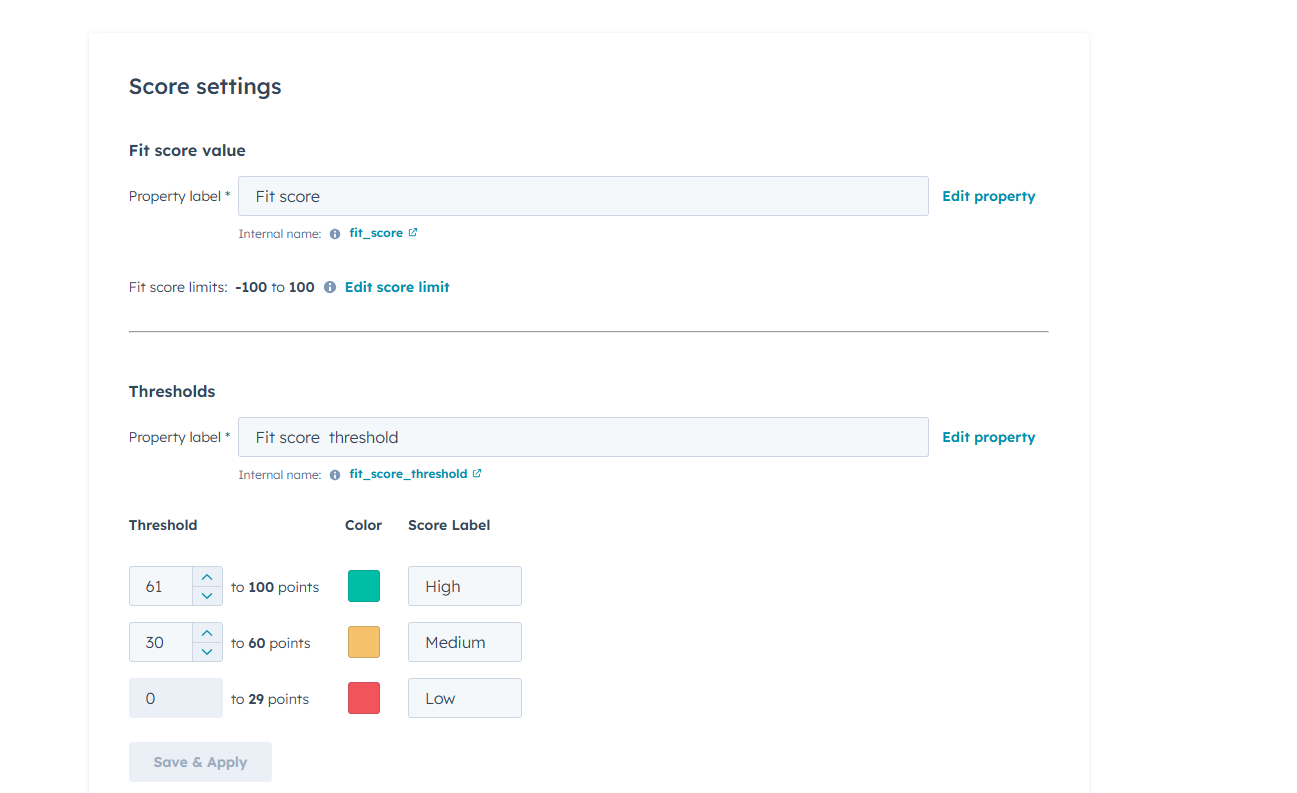
3. Configure lifecycle-stage automation to qualify contacts when they meet your established scoring criteria.
Remember, a high score supports the MQL qualification decision. It should reflect the criteria sales and marketing have agreed make a contact ready for follow-up.
Before activating automation, confirm that lead ownership, routing, and the marketing-to-sales handoff are ready.
That way, contacts who become MQLs have a clear next step.
For more on setting up and automating lifecycle stages, check out our HubSpot Academy video series on lifecycle stage management, where Shadab Khan walks through everything from defining stages and qualification triggers to building workflows and monitoring performance 👇
.png?width=1422&height=797&name=shadab%20academy%20main%20(1).png)
How Do You Measure and Improve Lead Scoring?
To measure and improve lead scoring, review newly qualified MQLs, gather sales and marketing feedback, monitor CRM data quality, and regularly refine your model.
Once your scoring model is live, you need to make sure it's identifying the right contacts and that your qualification process is working as intended.
Here's how to keep it on track.
1. Review Newly Qualified MQLs
Start by examining contacts that recently became marketing qualified leads.
- ICP fit: Do they match the companies and buyers you're trying to reach?
- Engagement: Are their interactions showing meaningful interest?
- Lead quality: Are these the types of prospects sales should prioritize?
Review individual contact records to understand which fit characteristics and engagement activities contributed to their scores.
This helps you determine whether contacts are qualifying for the right reasons.
2. Get Feedback From Sales and Marketing
Both teams should help evaluate how well the model is working.
- Ask sales: Are the qualified contacts worth pursuing? Are certain types of leads consistently falling short?
- Ask marketing: Are the scoring criteria still aligned with your target audience and the engagement you're generating?
Use that feedback to identify which criteria are helping surface qualified contacts and which may need to be adjusted or removed.
Applied Ceramics Case Study 
See how we helped Applied Ceramics improve lead qualification in HubSpot, track disqualification reasons, and identify which marketing channels delivered the most qualified leads.
Check out the full case study HERE!
3. Check Data Quality and Automation
Even a well-designed model can produce misleading results when CRM data is incomplete or automation isn't working correctly.
Regularly check:
- Property completeness: Are important contact and company fields populated?
- Engagement tracking: Are relevant interactions being captured?
- Lifecycle-stage updates: Are qualified contacts moving into the correct stage?
- MQL handoffs: Are contacts crossing the qualification threshold being handled as intended?
- Property access: Can sales and marketing see the scoring information they need?
- Data enrichment: Could filling missing properties help the model evaluate contacts more accurately?
4. Set a Recurring Review Schedule
Conduct an initial review approximately 90 days after implementation, followed by monthly or quarterly reviews.
Use these check-ins to review MQL quality, discuss feedback, and make adjustments as needed.
Recap: How Do You Build a Lead Scoring Model for SaaS?
Lead scoring for SaaS companies helps sales and marketing prioritize prospects based on how closely they match the ICP and how they engage with the business. A successful model combines fit and engagement data, assigns meaningful point values, and establishes clear thresholds for MQLs.
Here's what matters most:
- Define your ICP: Identify the companies and buyers you want to attract.
- Audit CRM data: Check property completeness, consistency, and engagement tracking.
- Fit scoring: Evaluate job titles, company size, industry, and other ICP attributes.
- Engagement scoring: Measure email interactions, website activity, forms, and product usage.
- Combined scoring: Evaluate fit and engagement together while keeping both scores visible.
- Assign points: Weight criteria based on their importance to qualification.
- Set scoring limits: Prevent individual activities from disproportionately influencing scores.
- Use negative scoring: Deprioritize poor-fit contacts without penalizing missing information.
- Account for recency: Use timeframes and score decay to reduce the influence of older activity.
- Configure HubSpot: Build scoring groups, contact views, dashboards, and sales-facing scorecards.
- Set MQL thresholds: Review score distributions and validate contacts before activating automation.
- Optimize regularly: Monitor lead quality, collect feedback, and refine scoring criteria.
Frequently Asked Questions About Lead Scoring for SaaS Companies
What is lead scoring for SaaS companies?
Lead scoring for SaaS companies is the process of assigning points to prospects based on how closely they match your ideal customer profile (ICP) and how they engage with your business. It helps sales and marketing prioritize leads, identify potential buyers, and determine when contacts are ready to become marketing qualified leads (MQLs).
What are the three types of lead scoring?
The three types of lead scoring are fit scoring, engagement scoring, and combined scoring. Fit scoring evaluates characteristics such as job title, company size, and industry. Engagement scoring measures interactions such as email replies, website visits, form submissions, and product activity. Combined scoring considers both to provide a more complete picture of lead quality.
How do you build a lead scoring model in HubSpot?
Start by defining your ICP and buyer personas, then audit your CRM data to identify reliable scoring criteria. Assign points to relevant fit characteristics and engagement activities, establish scoring limits, and account for negative signals and older interactions. In HubSpot, configure your scoring groups, create contact views and dashboards, and make scores visible to sales teams.
How do you determine the right MQL score threshold?
There is no universal MQL score threshold for SaaS companies. Start by reviewing your lead score distribution in HubSpot to understand how many contacts would qualify at different thresholds. Then examine individual contacts near your proposed cutoff to confirm they match your ICP and demonstrate meaningful engagement. Choose a threshold that balances lead quality with your sales team's capacity for follow-up.
How often should SaaS companies review their lead scoring models?
SaaS companies should conduct an initial lead scoring review approximately 90 days after implementation, followed by monthly or quarterly reviews. Evaluate whether newly qualified MQLs match your ICP, collect feedback from sales and marketing, and check CRM data quality and qualification automation. Adjust scoring criteria, point values, and thresholds when results indicate the model needs improvement.

-4.png)