A revenue model explains how a business earns money, while a B2B data model shows how customer and revenue data flow through your CRM. The Revenue Performance Model (RPM) connects these two frameworks, allowing revenue teams to measure acquisition, retention, forecasting, and revenue performance in one unified system.
Most companies try to grow by looking at the surface level of their business. You might have a solid saas revenue model on paper, but if your CRM is just a collection of names and deals that stay in their own separate corners, you’re making big decisions without the full picture.

In fact, 45% of new CRM records are duplicates, based on analysis of more than 12 billion records. When nearly half your data is unreliable, reporting, automation, and forecasting are just guesses.
Data only matters if it helps you make a choice. If you can’t point to the exact moment a lead stops moving between your marketing and your sales pipeline, you have a pile of numbers instead of a growth strategy.
To actually scale, revenue teams have to bridge the gap between their financial plan and their technical CRM setup. This blog explains what is a revenue model, how it differs from a b2b data model, and how the Revenue Performance Model (RPM) finally lets you follow the money from the first click to the final renewal.
Key Takeaways: The Blueprint for B2B Growth
- What is a revenue model? It’s your high-level strategy for earning money, such as a subscription or usage-based saas revenue model.
- What is a b2b data model? It’s the setup in your CRM that tracks how a person moves from a Contact to a Deal and finally to a Revenue Record.
- The Problem: Most revenue teams fail because they have a revenue model (a plan) but no data model (a way to see the work).
- The Solution: Use the Revenue Performance Model (RPM) to track the whole journey, from the first website visit to the final dollar kept.
Revenue Model vs. Data Model: Strategy vs. Execution
To build a team that actually hits its numbers, you have to understand the difference between your business plan and the system that supports it. It’s easy to get these two confused, but they do very different jobs.
What is a Revenue Model?
Your revenue model is your high-level business strategy. It explains how you charge customers and how you make money over time. Whether you use a subscription-based saas revenue model, a one-time fee, or a usage-based setup, the revenue model is the "what" of your business. It’s the plan of how you intend to be profitable.
What is a B2B Data Model?
A b2b data model is the technical execution of that plan inside your CRM. It maps out how a person moves through your sales process from start to finish. This model connects different objects (e.g. Sessions, Contacts, Deals, Revenue records) so the data stays together as it moves from marketing to sales. Without a solid data model, your CRM is just a list of names that don't tell a story.
The Intersection: Where Strategy Meets Reality
An easy way to look at it is that a revenue model tells you how you want to make money, while a b2b data model shows you how you are actually making it. When revenue teams align these two, they can track exact counts and conversion rates across the whole company.
A New Framework: The Revenue Performance Model (RPM)
To fix the gap between your strategy and your actual results, your team needs a specific architecture. This is where the Revenue Performance Model (RPM) comes in. Many teams use models like the Bowtie, which are great for a slide deck, but they often fail when you try to actually build them in a CRM. The RPM is different because it is designed to be a working part of your technology.
Three Specific Models
One of the biggest mistakes companies make is trying to force a standard "funnel" onto a unique business. The RPM is flexible because it offers three distinct versions depending on how you actually make money:
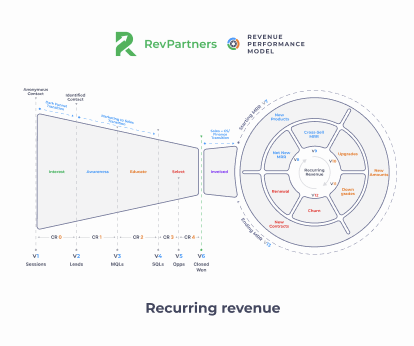
- The Recurring Revenue Model: The standard for SaaS, focusing on monthly or annual subscriptions.
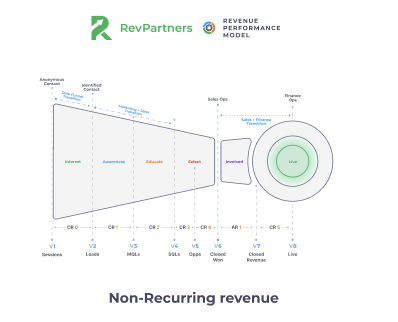
- The Non-Recurring Model: Designed for businesses that rely on one-time sales, using different metrics to track when revenue is closed versus when it goes live.
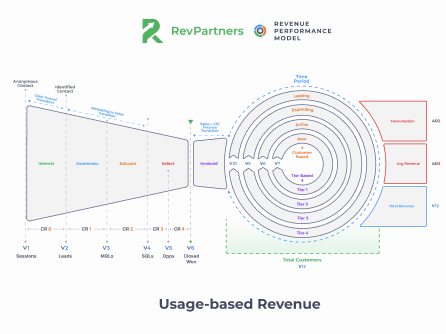
- The Usage-Based Model: Built for products where customers pay for what they use, requiring a different calculation formula to track growth after the initial sale.
Holistic and Functional
The RPM is built directly into your CRM to follow the money across every object, from the first website session to the final revenue record. While other models focus on the high-level stages of a contact, the RPM tracks how those stages connect to your actual bank account. It gives revenue teams a single source of truth so they can stop arguing over whose numbers are right and start making decisions.
Case Study: workvivo 
Workvivo struggled to track renewals and upsells due to messy deal structures.
RevPartners rebuilt their data model, turning scattered data into a system they could actually trust for forecasting and reporting.
Check out the full case study HERE!
The Funnel vs. The Flywheel
The RPM splits the customer journey into two clear parts:
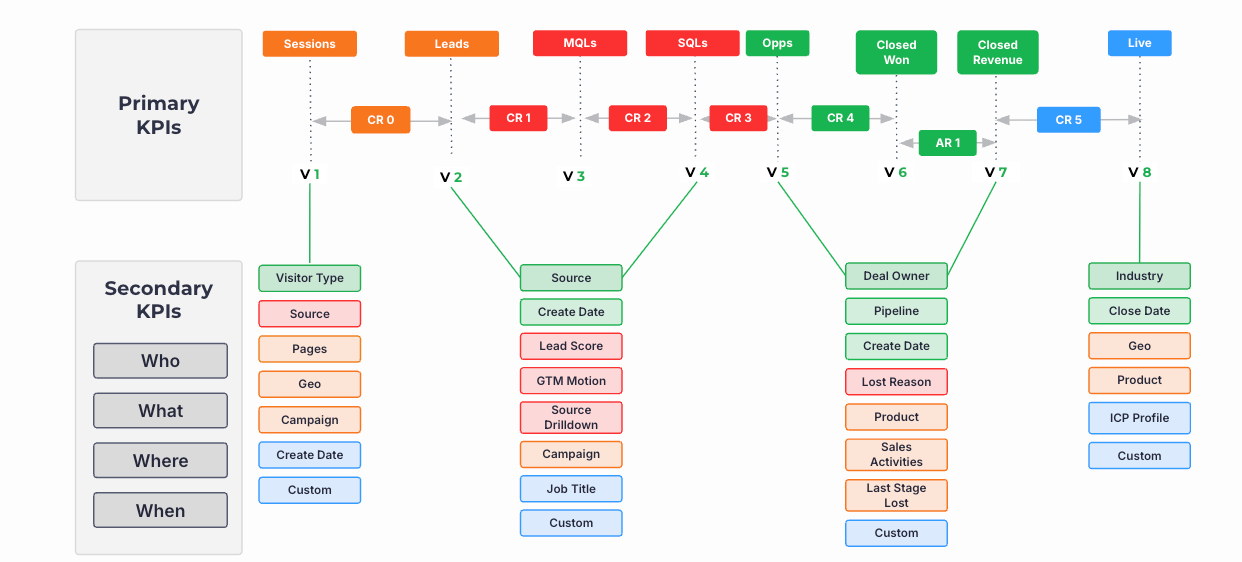
- The Funnel: This is the path to the sale. It collects volume (V1–V6) and conversion metrics (CR0–CR4) from the moment someone visits your site to the moment a deal is closed won.
- The Flywheel: This is where you measure your revenue potential. It focuses on what happens after the initial sale, specifically tracking how you keep and grow that revenue over time.
Instead of a linear path that ends when a contract is signed, the RPM views growth as a continuous loop. This ensures that retention and expansion are just as important as finding new leads.
For most B2B SaaS companies, best-in-class net revenue retention sits between 115% and 125%, which comes from expanding and retaining the customers you already have.
If your data model can’t track upgrades, churn, and expansion clearly, you’re missing the biggest lever in your business.
Cross-Object Tracking
In a typical saas revenue model, the journey is messy. A person might start as a session (Analytics), become a contact (Contact Object), turn into an opportunity (Deal Object), and finally become a line item in your finance system.
The RPM is built for this complexity. It ensures that data stays connected even as ownership shifts from marketing to sales to customer success.
Case Study: Color of Change 
Color Of Change had revenue split across tools like ActBlue and monday.com, making reporting nearly impossible.
RevPartners helped connect everything into HubSpot, giving them a single, reliable view of total revenue.
Check out the full case study HERE!
By tracking these metrics across different CRM objects, the RPM makes the invisible parts of your business visible. It shows you exactly where things are getting stuck so you can fix the problem before it hits your bottom line.

3 Steps for Revenue Teams to Build a Data Model
A b2b data model only works if it’s part of how you use your CRM every day. To move from collecting data to actually using it, revenue teams should follow these steps to build a system that lasts.
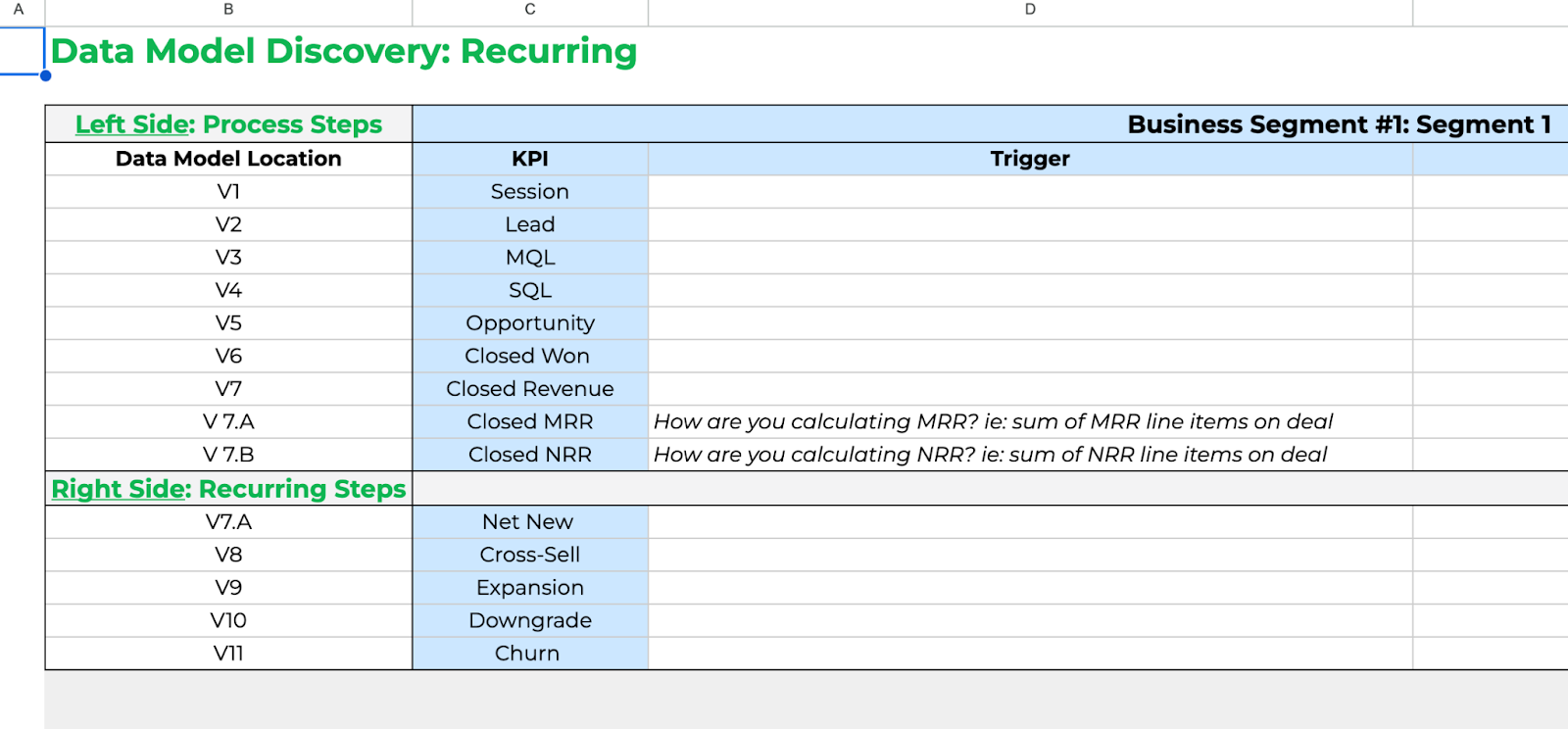
Step 1: Establish Universal Labels (V1–V13)
The first step is sitting down for a discovery session to define every stage of your journey. If your marketing team thinks a lead is anyone who filled out a form, but your sales team thinks a lead is only someone who booked a demo, your data will never be accurate.
You must establish universal labels for your volume metrics so everyone speaks the same language. Use the RPM to track everything from the first website session (V1) to the closed deal (V6). From there, you follow the money through the flywheel, starting revenue (V7), net new revenue (V8), and eventually your ending revenue (V13). Once these are defined, lock them in as your single source of truth.
Step 2: Identify Trends with Conversion Rates (CR0–CR4)
Once your volume metrics are set, your conversion rates will reveal themselves. By using the formula $Volume 2 / Volume 1 = Conversion Rate$, you can see exactly how effectively you move people and money through the journey.
Think of volume as the people walking through the door, and conversion rates as what they do once the door closes. If you notice your sessions (V1) are at an all-time high but your leads (V2) have dropped, you have a specific point of friction to fix. These metrics act as hand raisers that alert you to a problem before it ruins your quarter.
Step 3: Diagnose with Secondary KPIs and NRR
To truly scale your saas revenue model, you have to go one layer deeper. Primary metrics tell you that something happened, but secondary KPIs tell you why it happened.
- Partition Your Data: Break down your metrics by industry, geography, or salesperson. If your opportunities are down, is it a company-wide issue, or is one specific region struggling?
- Monitor Net Revenue Retention (NRR): Use the flywheel to track upgrades, cross-sells, and churn. This is the main metric for any recurring revenue business. It shows you the total amount of money staying in the business and allows you to create a strategy to grow your existing customer base rather than just hunting for new leads.
Recap: Why Every SaaS Revenue Model Needs a Strong Data Model
To build a scalable revenue engine, organizations should focus on:
- Define your revenue model: Understand how your business generates revenue, whether through subscriptions, usage-based pricing, or one-time purchases.
- Build a connected B2B data model: Link marketing, sales, customer success, and finance data so every stage of the customer journey can be measured.
- Standardize revenue metrics: Create shared definitions for volume metrics, conversion rates, lifecycle stages, and revenue milestones across every team.
- Track the complete customer lifecycle: Measure both customer acquisition and post-sale growth, including renewals, expansions, and churn.
- Use the Revenue Performance Model (RPM): Apply a consistent framework to identify bottlenecks, improve forecasting, and connect CRM activity directly to business outcomes.
- Continuously optimize performance: Monitor conversion rates, Net Revenue Retention (NRR), and secondary KPIs to identify where improvements will have the greatest revenue impact.
FAQ: Understanding Revenue Models and Data Models

What is a revenue model vs. a pricing plan?
A pricing plan is simply what you charge for your product. A revenue model is the big-picture strategy for how your business makes and keeps money over time. It includes your pricing, but it also covers your sales strategy, how you retain customers, and how you plan to grow your existing accounts.
How does the RPM differ from the Bowtie Model?
The Bowtie Model is a helpful visualization that brought attention to the right side of the funnel, retention and expansion. However, it often remains a theoretical or vanity metric because it doesn't have a defined CRM structure to back it up.
The Revenue Performance Model (RPM) is an operational architecture that lives in your CRM to track the full length of that journey. While the Bowtie stops at a high-level view of customer lifetime value, the RPM uses a specific net revenue retention formula. It tracks how money actually moves through upgrades, cross-sells, and churn, giving revenue teams a diagnostic view they can actually use to grow.
Why do revenue teams need a data model that covers everything?
When a data model is fragmented, marketing, sales, and finance all see different numbers. A unified model ensures that information flows correctly from a person's name to a deal and finally to a money record. This creates a single source of truth where everyone sees the same data regardless of their job title or department.
How does a b2b data model help with SaaS growth?
Sustainable growth requires knowing exactly what causes your company to scale. A b2b data model provides the math to prove which marketing and sales activities bring in the most money and which ones are falling through the cracks. This allows revenue teams to stop guessing and start spending their budget on the strategies that actually drive retention and expansion.

-1.png)