-4.png)
[Affiliate Disclosure: RevPartners is a HubSpot affiliate and receives a commission if you purchase through the links in this post at no extra cost to you. We only recommend tools we have verified for pipeline hygiene.]
To align marketing and sales in HubSpot, you need to get everyone looking at the same records, use Breeze AI to spot buyer intent, and automate your Lifecycle Stages. This setup ensures every department works from the same set of facts, which stops you from losing deals in the handoff between HubSpot Marketing Hub and your sales team.
Why do marketing and sales teams struggle with alignment?
Deals usually fall through the cracks because marketing and sales aren't on the same page. Marketing might be focused on hitting a specific lead count, while sales only cares about talking to people who are ready to buy. Without a shared plan for how to handle leads, the handoff is rarely clean. You see potential revenue stall simply because nobody agreed on when a prospect should actually be passed to a rep.
This friction leads directly to a lot of wasted time. If your team has to dig through spreadsheets or manually update records to find answers, they aren't selling. Every minute a rep spends hunting for a contact's history is a minute they aren't closing deals. Without sales and marketing alignment, the data in your CRM is hard to manage and even harder to trust. That lack of discipline is what eventually slows your growth and makes it way more expensive to win new customers.
How does the HubSpot platform fix disconnected team data?
The HubSpot platform fixes these breaks by acting as the main home for all your company’s growth data. Most software stacks are just a collection of separate apps that don't talk to each other, but the HubSpot CRM keeps all your information in one place. Every interaction, from a website click to a signed contract, shows up on one single timeline. In fact, 79% of sales professionals say their CRM improves sales and marketing alignment. This ensures every department sees the same details and works toward the same revenue targets.
Need to migrate to HubSpot? Find out how in this 5-part video series! 👇

Running HubSpot’s marketing tools alongside Sales Hub gives you a clear view of how a lead actually becomes a customer. You can see exactly which campaigns are making money and track how deals move through the funnel. Aligning marketing and sales on the HubSpot software lets you make decisions based on what’s actually happening rather than just guessing. It gives you the clarity you need to find where the process is stuck and fix it for the long term.
What are the key benefits of sales and marketing alignment?
When all your data lives in one place, growth becomes a repeatable process rather than a series of guesses. Aligning sales and marketing through the HubSpot CRM allows marketing to see exactly which leads turn into revenue, which in turn gives sales the context they need to close those deals. This setup gets everyone working toward the same revenue targets so they can stop debating whose data is correct and start focusing on the customer. And over time, that alignment compounds as companies with strong sales and marketing alignment grow around 20% annually, while poorly aligned teams actually shrink by about 4%.
The Real Impact on Your Bottom Line
The benefits of sales and marketing alignment include significantly higher conversion rates compared to businesses using separate tools that don’t talk to each other. Companies with aligned sales and marketing teams generate up to 209% more revenue from marketing.
Since the HubSpot platform tracks every customer interaction, you can stop chasing a high volume of random leads and focus your energy on winning the right deals.
This focus on quality is what helps you maintain strong Net Revenue Retention. And it doesn’t stop at the deal as aligned teams see 36% higher customer retention. Aligning sales and marketing ensures the customers you sign are a good fit for your product over the long term, which makes it easier to keep churn low. Using the HubSpot software to monitor these relationships helps you find expansion opportunities early, turning your customer base into a steady source of ongoing revenue.
Check out our workshop on managing retention in HubSpot 👇
Moving Through the Levels of Maturity
Getting your teams in sync usually happens in stages rather than all at once. Most companies move through these five levels as they refine their process within the HubSpot software:
- Level 1: Data Discipline. You start by moving away from spreadsheets and putting everything into the HubSpot CRM. This ensures everyone is looking at the same facts and the same customer history.
- Level 2: Communication. This is where the teams actually start talking. You set up a basic handoff process and agree on what a good lead actually looks like.
- Level 3: Predictability. Once your data is clean and teams are talking, you can focus on what comes next. By aligning sales and marketing around monthly goals, you use HubSpot’s marketing tools to forecast how many leads you need to hit your targets.
- Level 4: Automation. At this stage, you use HubSpot to handle the heavy lifting. You set up workflows to score leads and pass them to sales automatically, making the whole process faster and more consistent.
- Level 5: Total Transparency. Anyone in the company can see how a single marketing dollar eventually turns into a closed deal.
How to align sales and marketing effectively comes down to using the HubSpot platform to keep your process on track. It gives you the visibility to find where the process is stuck and the tools to fix it before it affects your profit.
How do you configure HubSpot for team alignment?
Once you understand the levels of maturity, you need to configure the HubSpot platform to support them. Moving from messy data to total transparency requires a specific technical setup that enforces the rules of your revenue process.
Step 1: The Unified Object Model
The HubSpot CRM uses a single source of truth for every Contact, Company, and Deal. In many tech stacks, marketing sees a "lead" while sales sees a "contact," and the two never truly sync. In HubSpot, everyone looks at the exact same record. This ensures that when marketing updates a company's industry or a contact's interest, sales sees that change instantly.
Step 2: Standardizing Lifecycle Stages
You need to define the path a lead takes from the first click to the final sale. You can fix departmental friction by configuring the HubSpot Marketing Hub to automate your Lifecycle Stages. By using quantifiable data, like specific pages visited or content downloaded, you can define MQLs and SQLs based on facts, not feelings.
Master lifecycle stages in HubSpot with RevPartners' Shadab Khan in this 5-part series 👇
.png?width=1422&height=797&name=shadab%20academy%20main%20(1).png)
Step 3: Quantifiable Qualification with HubSpot Score
Using the HubSpot Score tool allows you to assign points based on a prospect's actions and profile. This creates a clear ranking system that removes the subjective guessing that often leads to tension between teams, ensuring sales spends their time on the most engaged prospects.
Step 4: Leveraging Breeze AI for Intent Signals
You can make your outreach better by using Breeze AI to spot buyer intent. Breeze identifies signals that a human might miss, like a surge in research activity from a specific company. This allows your team to prioritize leads who are actually in a buying window right now.
Step 5: The "Golden Path" Handoff
The final piece is the automated sequence that moves a lead from marketing to a sales conversation without anything falling through the cracks. You can set this up using HubSpot workflows:
- Set the HubSpot Workflow trigger. Configure a workflow to start as soon as a Lifecycle Stage changes (for example, when a contact becomes an MQL).
- Automate Lead Rotation. Use the HubSpot platform to instantly assign the lead to a sales owner based on your territory or team rules.
- Generate a sales task. Automatically create a task in the HubSpot platform for the new owner to follow up. This maintains your speed-to-lead and ensures that no prospect is left waiting.
How to align sales and marketing depends on this level of technical discipline. When these steps are in place, the software does the heavy lifting, allowing your teams to work toward the same goals with total clarity.
How can you track sales accountability in HubSpot Service Hub?
Setting up the technical handoff is only half the battle. To keep the engine running, you need to ensure that sales is acting on the leads marketing provides and that marketing is learning from the leads that don't close.
Setting Expectations with Service Level Agreements
The most common point of friction is speed-to-lead. Marketing feels their leads are being ignored, and sales feels the leads aren't worth the rush. You can solve this by using HubSpot Service Hub to set up Service Level Agreements (SLAs).
By tracking Time-to-First-Action goals, you create a clear standard for how quickly a sales rep must engage with an MQL. This helps ensure the investment marketing makes in generating leads doesn't go to waste.
Closing the Loop with Sales Accepted Leads
Alignment only works if it’s a two-way street. Sales needs a way to push back when lead quality drops, but saying "these leads are bad" isn't helpful feedback. Instead, you can implement a Sales Accepted Lead (SAL) process within the HubSpot CRM.
By using rejection codes, you require sales to provide a specific reason when they disqualify a lead, whether the budget was too low, the timing was off, or the contact was the wrong persona. This data flows directly back to the HubSpot Marketing Hub, allowing marketing to adjust their campaigns based on real-world sales outcomes. This feedback loop ensures that lead quality improves over time because marketing is finally optimized for revenue, not just clicks.
The Lead-to-Cash Journey
Once these feedback loops are in place, you can look at your entire Lead-to-Cash journey. This is where you stop looking at individual department metrics and start looking at how money actually moves through your business.
Using HubSpot’s reporting tools, you can map out every stage from the first website visit to the final signed contract. This makes it easy to spot exactly where the process is breaking. If you have plenty of leads but they are stalling at the SQL stage, you know you have a qualification problem. If deals are being created but never closing, you might have a pricing or late-stage sales friction problem. Tracking this journey is what allows you to make precise fixes to your growth strategy.
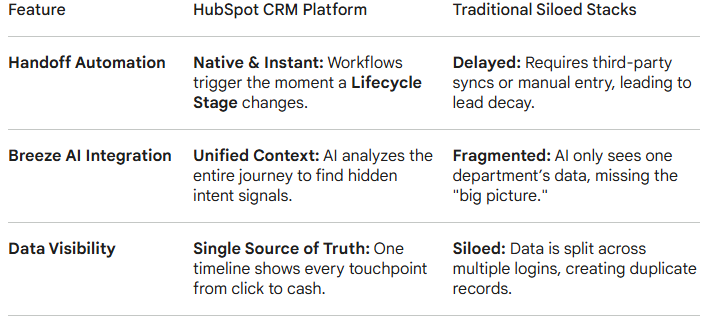
How does HubSpot compare to traditional siloed tech stacks?
Even with the best intentions, aligning sales and marketing is nearly impossible if your tools are working against you. Most growing companies fall into the trap of collecting specialized apps that don't talk to each other, often called SaaS Sprawl. When your marketing team lives in one platform and your sales team lives in another, you create a system of waste and duplicate records.
The HubSpot platform eliminates this friction by keeping every tool on the same foundation. This ensures that your speed-to-lead remains high and your data remains clean.
When should you use HubSpot for industry-specific alignment?
While the framework for aligning sales and marketing remains the same, the actual day-to-day execution changes depending on your business model. The flexibility of the HubSpot CRM allows different industries to customize how their customers actually buy.
Manufacturing
In manufacturing, the challenge is often coordinating between dealer networks and regional Field Sales teams. By using the HubSpot platform, manufacturers can centralize every lead and use automated routing to ensure they’re passed to the correct regional rep or dealer instantly.
Case Study: Harness Energy 
See how RevPartners engineered a custom HubSpot platform with automated lead routing and email workflows.
Check out full case study HERE!
SaaS
For SaaS companies, alignment often centers on managing high-volume trials. By aligning sales and marketing around product usage data, teams can use the HubSpot software to identify Power Users who are ready for an upgrade. Instead of sales calling every sign-up, they only engage when Breeze AI or lead scoring signals that a user is ready for a professional conversation.
Healthcare
In healthcare, alignment is about tracking patient journeys while maintaining strict data governance. Using the HubSpot CRM allows providers to coordinate between marketing and clinical intake teams, ensuring that a patient’s initial inquiry is matched with the correct follow-up care without the manual waste of duplicate records.
Case Study: MedicAlert 
See how RevPartners consolidated all data into HubSpot CRM, reducing API call errors to under 1%.
Check out the full case study HERE!
Frequently Asked Questions
What is HubSpot CRM actually best for?
It’s built to keep everyone who touches revenue on the same page. It stops manual waste where people are constantly double-checking data or hunting through different apps to see what a customer actually needs.
How does HubSpot stack up against other CRMs?
The big difference is how it’s built. Most big competitors are a combination of different companies they bought and assembled together. This usually leads to laggy data and sync errors. The HubSpot platform is "crafted, not cobbled," meaning every tool was built from the ground up to work together. Because it’s all one system, your data is live and your teams aren't constantly fighting with integrations.
What do we do if our lead quality is in the trash?
If sales is complaining about bad leads, you need to tighten your filters. Sit down and refine your HubSpot Score and Lifecycle Stage rules based on what a good lead actually does. Instead of just passing over every form fill, use Breeze AI to look for actual intent, like someone visiting your pricing page three times.
How fast will we see a difference?
The technical stuff happens almost instantly, but the people part takes a bit longer. You’ll see the speed-to-lead improve and manual data entry drop in the first month. Usually, by month three, those feedback loops between Sales Hub and Marketing Hub start resulting in a much cleaner, more predictable pipeline.
Are we stuck only using HubSpot tools?
Not at all. While the goal is to cut down on SaaS Sprawl, HubSpot has a massive marketplace. If you have a specific tool you can't live without, like a certain webinar or billing app, you can almost always plug it into the Unified Object Model. The important part is that the data ends up in one place so everyone stays in sync.
Alignment is a Work in Progress
At the end of the day, aligning sales and marketing is a process that needs constant adjustment as your business grows and your customers change how they buy.
By centralizing your operations on the HubSpot platform, you’re building a foundation where data is out in the open and feedback happens in real time. When you stop fighting with your tools and start using them to bridge the gap between departments, you stop losing deals to messy handoffs and start growing with a lot more confidence.
-1.png)
.png)